Abstract
The increasing use of electronic mail and the great diversity of materials that are sent via electronic mail has resulted in people having problems managing the volume of mail and identifying important messages in their mailboxes. Until recently, electronic mail consisted of plain text. However, with proposed new standards it is now possible to send and receive sound, graphics, compound messages and many other types of mail. These new formats are likely to pose new problems to the user who wants to handle mail efficiently.
This M.Sc. report describes the research, design, implementation and future development issues for an innovative prototype mail filterer. An Object Oriented (OO) Analysis and Design method that was used to implement the filterer is also presented.
The filterer is designed to be user-friendly and to handle electronic mail messages that conform to the draft standard for Multi-Media mail written by Nathaniel Borenstein and Ned Freed. This draft standard, called Multi-purpose Internet Mail Extensions will be referred to in this document by its usual abbreviation MIME.
The filterer implemented is believed to be the first user friendly mail filterer built specifically for MIME format mail.
Abstract...................................................................................................................................... 1
Acknowledgements...................................................................................................................................... 4
1. Introduction and background 5
1.1. Aims.......................................................................................................................... 6
2. Research 6
2.1. Project History 7
2.2. Prior knowledge 7
2.3. Filterer research 8
2.4. Existing Filterers 11
2.4.1. Diagram of a mail system with filterer 13
2.4.2. Text based mail filterers 14
2.4.3. GUI based mail filterers 14
2.5. MIME 15
2.6. Development environment 16
3. System specification 17
3.1. User requirements 17
3.2. System requirements 19
4. Analysis and Design 20
4.1. Research of Analysis and Design Methods 20
4.2. Outcome of Analysis and Design Research 20
4.3. Analysis 22
4.3.1. Analysis diagram 22
4.4. Design 23
4.4.1. Overview design model 23
4.4.2. Table of correspondences between design meta-classes 24
4.4.3. Design model for problem domain and interface classes 24
4.4.4. Design model for application interface classes 25
4.5. HCI aspects 25
5. Implementation 28
5.1. HCI aspects 28
5.1.1. Examples showing user interface 32
5.2. Coding issues 34
5.2.1. Use of wxWindows demonstration programs 34
5.2.2. Discussion of code 35
5.3. C++ issues 38
6. Discussion 40
6.1. Major problems encountered 40
6.2. Evaluation of achievement 42
6.3. Major Outcomes 44
6.3.1. Departmental outcomes 44
6.3.2. Personal outcomes 45
6.4. Future Directions 45
6.4.1. Development of Application 45
6.4.2. Filtering trends 46
6.4.3. MIME and Industry trends 47
6.5. Summary 48
7. References 49
Appendices...................................................................................................................................... 52
A. User Documentation 52
1. Installation 52
2. First time use 52
3. Subsequent use 53
B Description of program menu items 54
C Sample program output 57
D Project Schedule 58
E Survey responses 59
F Points from December review 61
G Project Diary 63
H Overview of wxWindows 68
I Overview of procmail 69
J Overview of Pine 70
K Sample MIME message 71
L MIME types 72
M Code Samples 73
Acknowledgements
I would like to thank the following people for their assistance with this project
My project supervisor Alison Crerar for her support, guidance and comments and particularly for the thorough reviews and extensive comments on this report.
Julian Smart at the Dept of Artificial Intelligence, University of Edinburgh for help with using his wxWindows tool.
Neil Rumney for his help with keeping the link between the Department of Computer Studies and the Internet running so that I could access discussion lists and for installing a considerable amount of software on the Suns.
Finally, all the people on Internet who have replied to my mail messages and postings to news with questions related to this project.
1. Introduction and background
The author of the project has been interested in the subject of Electronic Mail for some time. For several years, he has jointly run a world-wide language teaching mailing list. (GAELIC-L). In 1992 he founded The UK Internet List, the first guide to the UK's Internet providers, and has been using electronic mail in various forms for over 10 years. At Digital, he used world-wide E-mail on a daily basis as part of his job. It was through seeing the usefulness of this powerful business medium that the motivation arose to research future mail developments for this project. The project was the author's own proposal.
As the result of being on several mailing lists, ranging from the purely technical and work-related to others of a more recreational nature, the author receives about 40 mail messages a day. Many of these are automatically generated by the software controlling the GAELIC-L list. There is a danger, when receiving many messages of differing priority, that some important ones may get lost in the volume. In just the same way that many managers have a secretary to prioritise and sort their incoming letters, so it is useful to have a program handle incoming electronic mail in a similar way. The author has previously used a simple mail filterer and found it very useful, but it was easy to enter the wrong command and find that all the incoming mail was being automatically deleted. This accidental error could prove very costly in business and so it was decided to implement a system that was much more fail-safe.
Although mail filterers have been in use for several years (e.g. Deliver [ER3], ELM-Filter [ER4]), none have addressed issues concerned with the draft MIME standard. It is likely that MIME will become a full standard by the end of 1994. MIME covers more than just Multi-Media however, it can also be used to send and receive structured messages and foreign character sets.
Research into filterers also revealed that there are were no known free filterers that have a user friendly interface. To address this issue, the filterer implemented for this project was designed to be easy to use. Two important considerations were that the filterer should provide simple access to the most frequently used actions which users require, whilst allowing more specialised users access to other, less frequently used facilities.
Procmail (see Appendix I) was identified as a tool capable of supporting filtering based on the draft MIME standard. This tool was chosen because it was recommended as being very powerful, it was free, it runs on UNIX and is not tied to a particular mail tool.
When the author started to research MIME based filterers, there was very little information available. Indeed, one of the developers of a MIME compliant mail tool wondered what the usefulness of such a tool would be. The idea of designing a filterer with MIME in mind seemed to be novel. The author is fairly sure that when the project started there were no other user-friendly free MIME filterers.
The project was undertaken by the author and was assisted by staff in the Department of Computer Studies. In the early stages of the project, assistance was also provided by the Computing and Communications department of Washington University in Seattle who developed the MIME based mail tool, Pine (see Appendix J for more information). Pine was used to investigate Multi-media mail issues, including header contents and message structure.
Various people on the world-wide electronic network, the Internet, assisted with the project. Two discussion lists were particularly useful. One list was for the wxWindows product by Julian Smart at Edinburgh University (see Appendix H) which was chosen as the development environment, and the other for the procmail product by Stephen R. van den Berg at RWTH-Aachen, Germany (see Appendix I) to understand how the mail filtering worked. Access to these lists has proved invaluable, particularly as the author introduced both wxWindows and procmail to the Department during the project. This meant that there was no one in the Department who knew anything about the products, and so support from experienced users elsewhere was essential. The author also pioneered student access to usenet newsgroups and became the first student at Napier University to access usenet. Access to the object oriented usenet newsgroups has also proved a valuable source of information.
1.1. Aims
The following were identified as aims of the project:
i. To research traditional mail filtering.
ii. To research mail tools which support MIME.
iii. To use a MIME based mail tool and a traditional mail filterer to implement a new prototype filterer capable of supporting MIME.
iv. To ensure the prototype implemented meets the needs of users, including functionality and usability.
v. To apply the skills learnt during the M.Sc. to a large Software Development project and to research and solve problems associated with implementing Object Orientation.
2. Research
Much of the research for the project was carried out by non-conventional means. The primary research was carried out by identifying key usenet newsgroups to ask questions in, such as comp.object for Object Oriented (OO) related questions, comp.lang.c++ for C++ related questions and comp.mail.mime for questions related to MIME. By asking questions in these forums and having electronic discussions, it was possible to research issues by locating relevant papers, files, key individuals and research establishments. Recommended papers not available on-line were obtained by inter-library loan.
To carry out research on subjects that are very new, it was apparent that using libraries alone was not going to yield enough current information. Therefore access to usenet newsgroups had to be obtained to ask questions, learn about announcements and participate in discussions. As Napier University was not projected to have Internet access available until Spring 94, facilities at Edinburgh University were identified as a means of conducting this on-line research. The author became the first student in Napier University to have access to such resources.
2.1. Project History
The project has undergone several major revisions before being accepted in its present form. In October, the proposal was to port the MIME-based mailer Pine to a windows environment, to make it easier to use. However, porting Pine proved to be too big and difficult a problem, particularly as the underlying Pine code was still rapidly changing. Four Pine update releases were issued during the development of the present project. The Pine developers at the University of Washington in Seattle suggested that a filterer for Pine would be a useful self-contained addition to the product. Having used filterers before, the author could see the benefits of such a system and so agreed to take this on as the project. This proposal was put to the Department and accepted as a project on 22nd October 1993, giving a total of 14 weeks for the project to be completed. As time was so limited, it was crucial to thoroughly plan the project and identify milestones at the outset. To ensure that these milestones were achieved, a schedule was written, and is detailed in Appendix D. A copy of this schedule was given to Alison Crerar the project supervisor, so that she could monitor progress.
2.2. Prior knowledge
Although the author had used E-mail for some time before joining the course, this was exclusively on VAX/VMS machines. When the author started the LSSD course, he had not used any of the following systems before: PCs, UNIX, C++, Borland's Resource Workshop, procmail, wxWindows or Microsoft's Word for Windows. Although the author had previously used mail filterers, he had never heard of MIME before - this was first encountered while researching for an option taken earlier on in the M.Sc. In addition, the author had not met with Object Oriented methods previously and only had a basic knowledge of traditional analysis and design. Virtually every module on the course, and in particular the research project, has been undertaken with no prior knowledge at all. Many of the resources used on the project, wxWindows, procmail, MIME and Pine were introduced by the author to the Department and so there was no local access to any Departmental experts on these topics, all help had to be sought via the external network.
As a result of coming across so many new subjects during this project, many of which were not formally taught as part of the LSSD degree, the author has had to carry out a great deal of personal research to identify issues, relevant papers and software. Although the author wrote part of a windows application as part of the Post Graduate Diploma part of the course, much of the windows programming was handled by other team members. To overcome the considerable learning curve for so many different aspects, a development environment was chosen which would allow the rapid creation of a windows application without having to become an expert in Windows programming first.
2.3. Filterer research
As Napier University is not fully on the Internet yet, many staff and students at Napier University are not aware of the benefits or indeed pitfalls of full Internet connection. For example, the volume of mail for most users within Napier University is manageable. The problem of excessive volume and managing large quantities of mail however becomes apparent when messages from outside the University are considered too, and when additional messages arrive as the result of postings to news, then the volume increases still further. These overloading problems are mainly due to the very large volume of users, interest groups and discussion lists on the Internet. Conservative estimates of Internet usage [ER7][1] put the amount of Internet traffic at about 60Mb a day of news. With the rapid growth of the Internet (9% a month), and its continual development [Press93] the volume of material on the Internet is not only growing rapidly, but is becoming more complex too. A few years ago, the information on the Internet was simple text, whereas today it is possible to send sounds and graphics by electronic mail, with ease.
Recently, the Internet has been getting considerable publicity and with the recent publication of many books on the Internet it seems that the Internet is going to become much more a way of life. E-mail addresses are becoming more common on business cards and even non-computing publications are including articles about the Internet and mentioning it on their covers[2]. With increasing numbers of non-computing users connecting to the network [Pope94], it seems the 9% growth per month is set to increase considerably.
There is clearly a major problem of "information overload" that is getting worse, and tools are required to help people to manage the huge volume of material which is available. Moreover, the problem is not confined to mail, usenet news carries about 60Mb of news a day, and the only support most newsreaders have for filtering messages is simply to delete ones which match certain criteria. It is apparent however, that news and mail technologies are merging and some mail readers such as Pine offer an interface to usenet newsgroups, as the MIME standard also applies to news articles on usenet. Clearly any lessons and applications based around E-mail filtering could also apply to usenet news.
A filterer may help to correct what has been called the "productivity paradox" [Constant93]. That is, that despite the huge investments in Information Technology, the expected huge productivity improvements have not been realised. A possible reason for the paradox is stated as "IT is being used to provide managers with a greater sense of control, without actually improving their decision making". This idea is also mentioned in [Brynjolfsson93] who states:
A valuable heuristic in 1960 might have been "get all readily available information before making a decision." The same heuristic today would lead to information overload and chaos. Indeed the rapid speedup enabled by IT can create unanticipated bottlenecks at each human in the information processing chain. More money spent on IT will not help until these bottlenecks are addressed.
The aim of a filterer is ultimately to help people decide which messages to read, their priority and how they should be presented. This structuring of mail will go a long way to improving its manageability and helping people at all levels of an organisation to be better informed.
A filterer works by processing electronic mail and performing some action based on various properties of the mail message. This action could include forwarding the message to other users, filing the message in a mail folder, running an application, printing the message or attaching fields to the message so that it can be prioritised or handled by an advanced mail reader. Probably the most popular use for a mail filterer though is to "answer" mail while the user is away on holiday or a business trip. Such a facility sends back a standard reply containing a message, usually explaining that the person is away and when they are likely to return.
A mail filterer is activated by running a set of rules on the mail messages. The rules are composed of two parts, the matching criteria and actions to perform. The matching algorithm compares information about the mail message, usually stored in the mail's header fields to decide whether a rule should apply to the mail message. The action to perform specifies what the mail filterer should do with the message if the match criteria hold true for the message. Some simple filterers are batch jobs which run at regular intervals and process messages in the user's mailbox, however such filterers have the dual drawbacks of activating even if there is no mail to process and of causing delays in the processing of messages. Therefore, the filterers presented in this document are all of the kind which do not run at regular intervals, but are instead called on-demand when a message arrives for the user.
To fully understand how the functionality of a filterer can help users, a few examples will be given to illustrate the uses of a filterer.
The author has been working at home using a modem to keep in touch with Napier University and mailing lists for the last 8 weeks of this project, and is amongst the growing numbers of teleworkers[3]. A filterer is of use to teleworkers, particularly the self employed, who have to pay their own phone bill. By having a mail filterer it is possible to restrict the messages that are downloaded. The author has used a "kill file", a simple form of filtering mechanism, to prevent very large messages from being downloaded as these would tie up the phone for a long time and run up a large bill. Many people have been using kill files for news articles for a long time, but some mail systems now support kill files too. The author also inadvertently sent a 120K MIME message containing graphics to an experimental MIME based list, without realising that the list was based at a site that paid 9p per kilobyte for international E-mail. With a dozen people on the list, this message could easily have cost 9p * 12 * 120 = £144 to forward on to all recipients if it had not been detected. Clearly, many telecommuters would welcome a facility which could save this much money automatically.
Instead of simply deleting long messages, a more intelligent mechanism might be to automatically redirect long messages to an account based at work or to extract just the text portion from a message containing sound and graphics. The facilities people have at home may also be less sophisticated than the facilities available at a University or computer company. It unnecessarily adds expense to a user's phone bill if they are paying to down-load a multi-media message (often over 500K bytes) containing sound and graphics to a machine that does not have the capability to display the graphics or play the sound in the message.
Another possible use for people with computers at home is to use a filterer at the office to forward mail which is likely to be non-work related onto their electronic address at home. This saves time in the office sorting the work related from the non-work related messages and allows non-work related messages to be replied to at leisure in personal time at home. In addition, messages that the teleworker is likely to want to read at home as well as in the office can easily be copied by a filterer so that work can continue at home if necessary.
Experienced mail filterers seem to adopt strategies for managing their mail. [Mackay89] reports three main strategies, namely:
i. Keep it all
ii. Move unimportant messages
iii. Move important messages.
The strategy (i) is not explained in the article, but is likely to include appending characteristics to mail messages (e.g. additional headers) or printing out particular messages. Neither of these actions has been implemented in this project, although procmail itself is capable of doing this.
Strategy (ii) moves unessential messages out of the in-box and uses the in-box as a store for unprocessed messages and things to do. Rules are used to identify low priority messages and to move them into folders or delete them. This prevents low priority messages from building up and cluttering a user's in-box.
Strategy (iii) involves writing rules to recognise high priority messages and moving them to a "priority" folder. Many people classify mail that is addressed personally to them (as opposed to mail received from a distribution list) as important. All these users disciplined themselves to read the "priority" folder first. The article reports that one user who was initially distrustful of mail filtering on incoming mail decided to create two rules to manage all his mail. One rule identified all personally addressed mail and moved it to a "priority" folder and another identified all mail related to a conference he was running and this rule sent all these messages to the conference administrator. This user said that this strategy was "very, very useful", that his mail before was "out of control" and that using these two rules "changed my life".
2.4. Existing Filterers
To find out what tools are available, questions were asked on a number of usenet newsgroups and other on-line resources were located and searched. By querying the HCI Bibliography Database [ER8] under the keyword "rules" and "filter", a useful study was found on how people use mail filterers, the kind and number of rules they define and the way they are grouped [Mackay89]. This paper mentions that moving and deleting mail messages are the two most common uses for a filterer and that the majority of users prefer to have rules execute automatically as mail arrives, rather than applying rules retroactively to mail which has already been delivered.
In October 1993, the author spent two days in Seattle, Washington visiting the Pine development team. During discussions, it became apparent that a mail filterer could be considered as a completely different program to the Pine mailer itself. Rather than making the filterer integral, a filterer could simply run between the incoming mail daemon which accepts the messages on the system and the Pine mailer which allows the users to read and reply to mail. With many filtering actions, it is possible that the mails might never reach Pine at all, this would be the case if the message being filtered was being forwarded to another system, or being piped into an application or being deleted. It seemed sensible therefore not to consider the filterer to be a part of Pine, but to consider writing it as a separate program which would generate output not only for Pine but for other mail systems too. To fully evaluate the implications for writing a separate filterer, two mail systems [ER5] [Mackay89] were studied which do have integrated filterers to understand the possible disadvantages of not implementing an application integrated with Pine.
The outcome of researching into separate filterers against integrated filterers resulted in the following key points:
Advantages of a
combined mail reader and filterer
i) The mail reader and the filterer are likely to have a consistent and integrated user interface. This is the case with Lotus's cc:Mail V2.0 [ER5] which was evaluated and which has filtering capabilities. The method of entering rules is very much with the same "look and feel" as using the rest of the mail system.
ii) Many users think of rules whilst reading mail [Mackay89]. An integrated filterer is therefore likely to be quicker and more convenient for users to access and add rules to when reading messages.
iii) The mail reader is able to view "deleted" messages. In The Information Lens [Malone87a] [Dix93], messages that have been deleted are still accessible by the user, but they are presented with a line drawn through them. This allows the user to verify that the correct messages are being deleted and allows "deleted" messages to be retrieved if necessary. If the filterer is independent, then messages are nearly always deleted before reaching the user's mailbox and the user never sees them.
iv) An integrated filterer is able to access the functionality in the mail reader that deals with handling structured MIME messages and decomposing them. This allows much more sophisticated handling (e.g. deleting part of a message)
Advantages of having the mail reader and
filterer as separate applications
i) A separate filterer is not dependent on one mail system, it can work can work with whatever mail tool the user prefers to read their mail with (e.g. Pine, ream, Elm)
ii) It is easier to build a separate mail filterer than it is to write a standalone application, due to the increased dependencies. This is particularly true when the mail reader has bugs and is still being developed.
iii) A separate filterer is usually more easily ported to other platforms, as it is smaller.
iv) A separate filterer means that the filtering can take place on a system that the mail reader might not run on.
v) A separate filterer does not require integration with the existing code. This can be particularly problematic if the two applications are written in different languages and under different paradigms (e.g. OO and non-OO). Research conducted in this area showed that many people who had tried to implement OO code on top of existing non-OO code had to abandon the project and rewrite everything in OO. This is of particular issue with this project as Pine was written in C and is non-OO. Interestingly, the author does not know the language which procmail is written in as it has never been necessary to know this.
vi) A separate filterer does not require the same learning time to write, as it is not necessary to learn how to interface with the mail reading code.
Having considered the advantages and disadvantages, it was decided that an integrated mail filterer can potentially offer more functionality but the logistics of writing an integrated filterer were outweighed by the need to minimise difficulties associated with integrating an OO application with a non-OO application and having to understand the internals of a volatile mail reader. Therefore a decision was reached to write a filterer as a separate application.
2.4.1. Diagram of a mail system with filterer
The following diagram shows where a separate mail filterer fits into the mail system and demonstrates some of its capabilities.
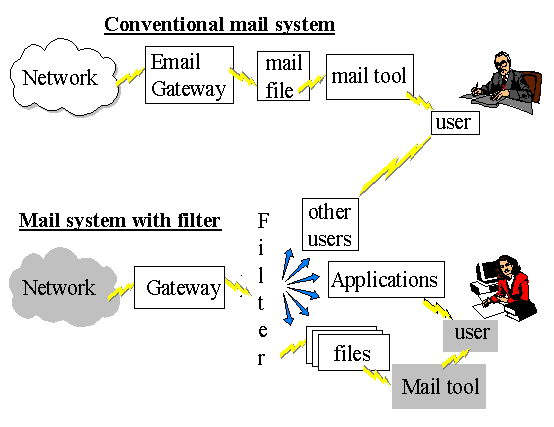
The decision to separate the filterer from Pine resulted in the project proposal detailed in section 1.1 being revised on the 8th of November. This revision was to make a separate mail filter the key deliverable of the project.
Writing a separate filterer from Pine also meant being no longer dependent on the Pine development team, and this lessened risks associated with the project. From the logistical point of view, there was also insufficient Internet access from Napier University to write extensions to Pine. Pine is approximately 4 Mb and the only ways of receiving updates to the code would either have been to have them posted on disk, sent by FTPmail or copied to Edinburgh University and downloaded to several floppy disks from there. Having used FTPmail once to install Pine for evaluation purposes, it was evident that this was an unacceptable method of working as the mail gateway resulted in the files being split into dozens of mail messages that have to be manually edited and reassembled in the correct order. This method was tried once and it was decided that it was not feasible to use FTPmail again. Both of the disk options would also have been very time consuming.
A number of filterers exist already, and these have been categorised here by whether they have a Graphical User Interface (GUI) or whether they are dependent on the user editing a text file and writing the rules manually. A useful review of GUI E-mail packages was published in [Collin94]. Three of the five products reviewed in this article have integrated filterers.
2.4.2. Text based mail filterers
i. Deliver [ER3]. This is a tool that the author has used previously, but which only runs on VAX/VMS. Filtering is via Boolean logic and is limited to the fields in VAX/VMS mail, namely "from" "to" and "subject".
ii. Procmail (see Appendix I). This is the tool chosen for the project for reasons mentioned earlier.
iii. Elm Filter [ER4]. This filterer is based on the popular Elm mail tool. This filterer only allows filtering on the "to" "from" "subject" fields, the size of the message and the message content. There is no facility to understand MIME.
2.4.3. GUI based mail filterers
i. The Information Lens [Malone87a], [Mackay89]. This provides a forms based interface and allows messages to be filtered based on Boolean logic match criteria on the following header fields: "from" "to" "cc" and "subject" as well as the message contents.
ii. The Andrew Message System (AMS) [ER6]. Little information was obtained about this system, however it is of particular note as it is the only mail tool known to be capable of splitting messages and processing components of a composite MIME mail message. If a user sends a message with non-text components to a non-AMS recipient, AMS can cut out the non-text and replace it with a message indicating what was removed. This intelligent processing of MIME messages could prove very useful for instance to direct just the text components of a MIME message to a home based mail address.
iii. BeyondMail 2.0 and BeyondRules. [Collin94] states "BeyondMail broke all the rules in its first version. It included what everyone needed but didn't realise they did- intelligent, programmable rules". This product has by far the most sophisticated rule handling of any application studied, and includes system wide rules that apply to all users, rules that become activate or inactive over time and reminder rules. The filtering interface to the program is the only known commercial filtering application, BeyondRules. BeyondRules offers filtering capability to Microsoft Mail 3.2 which does not have rules. Mail filtering in BeyondMail is cited in [Lindholm93] as one of the three key goals necessary for a commercially successful product.
A key point learnt from conducting research into filterers is that it is quickly becoming the norm for commercial mail tools to have either a filterer built in, or have an optional add-on filterer. Mail tools that do not have filterers are now regarded as commercially inferior.
2.5. MIME
MIME is a new protocol designed to handle many of the shortcomings with existing mail, which is limited to sending US-ASCII characters. The MIME standard was officially published in June 1992 as RFC1341. [ER1].
For an example of a MIME encoded mail message, see Appendix K. The most important header in the message is the one that explains the Content-Type. The example in the appendix is MULTIPART/MIXED. This means that the type is MULTIPART (meaning the message has more than one component) and the types of those components (the subtypes of the message) are MIXED. For a full list of MIME types and subtypes, see Appendix L.
Although the implementation of MIME does not require a great leap in technology, there have been several failed attempts at introducing a MIME standard. MIME itself was designed for graceful inclusion in the Internet protocol suite. It does this by not building an entirely new protocol but by adding features to RFC822 mail. This is called a bottom up approach by Nathaniel Borenstein, the author of the draft MIME standard. Earlier experimental models for Multi-media mail (RFC767, RFC759) took a different approach by building a new transport and document format that did not behave compatibly with the existing mail protocol (RFC822) and would have required disposing of a popular and working model for mail. Ensuring backwards compatibility may not always result in the most academically pleasing implementation (compare the evolutionary C++ with Smalltalk), however an evolutionary approach is usually more likely to result in a working implementation and one that is widely accepted.
It was considered important to investigate mail tools that supported MIME so that one could be installed in the Department to generate MIME mail messages and to provide a means of testing out a MIME based filterer
The main source of information for MIME based mail systems was the comp.mail.mime Frequently Asked Questions list (FAQ) [ER9]. This is nearly 80Kb of extremely useful information and has a section on commercial and freely available MIME products, including mail systems and news readers. Another excellent source was an M.Sc. report by Magnus Hedberg which covers Multi-media mail systems and Asynchronous Computer Supported Cooperative work [Magnus92].
From the research carried out into MIME mailer systems, the Pine system was chosen as there was no other system detailed which matched the hardware available in the Department and which was easy to use. The installation kits for the PC version and UNIX versions of Pine were obtained and Pine was installed on a PC in the Department. Pine was then configured to send messages to the Departmental Suns and the external network to evaluate the system more fully. Once Neil Rumney had installed the required software on the Sun, the UNIX version was also configured. Word of Pine's capabilities and user-friendly interface soon began to spread and it has now become the preferred mail tool of many people in the Department, particularly those who are new to electronic mail. The author now uses Pine on a daily basis, and has configured it to send and receive accented characters such as á, è, í, etc. This has made conversing in languages other than English much more convenient as accented characters can be sent and received through the mail to other MIME users without corruption.
2.6. Development environment
Four commercial packages for development under Microsoft Windows were available in the Department. These were:
i. Visual Basic
ii. Visual C++
iii. Borland C++
iv. Asymmetrix Toolbook
Visual Basic and Asymmetrix Toolbook are ideal for rapid prototyping of user interfaces, however neither supports Object Orientation and so neither was considered suitable for a project of this size. It seemed that for the purposes of the project, there was no difference in the suitability of Borland C++ or Visual C++ and so Borland C++ was chosen as the author had used Borland C++ to develop two applications earlier in the course.
Not having chosen Visual Basic or Asymmetrix Toolbox caused a major problem in that the user interface is a major part of the program and Borland C++ does not provide a good environment to quickly develop a complex user interface. Therefore, an environment had to be found which would allow rapid development of the user interface in the 14 weeks available to develop and document the project.
A request was posted to the Internet newsgroups comp.object and comp.lang.c++ to see if there were any suitable applications that could be used with Borland to assist with rapid prototyping. Although these groups are distributed world-wide, the only reply received was from Julian Smart at Edinburgh University AI Department, and mentioned his wxWindows tool. WxWindows is a multi-platform C++ development environment designed to help users write portable code and hide users from many of the difficulties of windows programming. WxWindows also allows HCI based applications to be developed quickly as it provides its own well-documented class library. Although there would be a learning curve associated with wxWindows, the demonstration programs of wxWindows showed that it could provide the required functionality and seemed an ideal choice. WxWindows also had the benefit of being compatible with the Department's existing mail platform (UNIX) and the Department's proposed mail platform (PCs). A further benefit is that plans are underway to port Pine from MS-DOS to Microsoft Windows. By already having a MIME compatible filterer in Windows, it could integrate well with Pine when the Windows version of Pine is complete.
A decision was therefore made that wxWindows would be used as the development environment. However, there were two problems with wxWindows, namely that no one in the Department knew anything about it (therefore I was dependent on the Internet for help) and the other problem was that wxWindows was developed for use with Turbo C++. This resulted in the author becoming the first person to port wxWindows for use with Borland C++.
It is certain that without wxWindows, the tool would not have been developed as quickly as it has been.
3. System specification
To specify the system that was to be built, it was necessary to investigate the requirements of potential users. This would ensure that the aim of designing a system that provided the most useful functionality was fulfilled. From these user requirements, the software and hardware required for such a system was then identified.
3.1. User requirements
Clearly with the information overload mentioned in section 2.3, some tools are required to manage the volume of mail. Time is valuable, and the more a computer can assist people to do their job, the more productive they are likely to be. However, it was first necessary to establish the functionality that a mail processing tool should provide.
No one in the Department is known to use a mail filterer at the moment. Procmail has not been announced to the Department and no other filterers in the Department are known to exist. This is likely to change however soon, when Napier University becomes fully connected to the Internet and more and more people start to use the Internet and participate in newsgroups. Asking questions in newsgroups, and posting notes to newsgroups can generate many replies via E-mail, some of a low-priority personal nature and others of a high priority work related nature. It has been interesting to note that while this project was underway, a great increase in usage of E-mail within the Department and use of the Internet has taken place.
To fulfil the aim of giving users access to the most frequently used filtering actions, the author conducted a survey in the Department to determine which features would be the most useful to implement. Three replies were received from members of the Department who receive large amounts of mail, and their replies are summarised in Appendix E. The action "move message to a folder" was rated as priority 5 (the highest) by all recipients. Other actions that were rated highly include auto-replying to messages and forwarding messages to other users. Whilst the results for this survey were useful, it was felt that as the people surveyed had never used a filterer before, it was necessary to carry out additional research.
To anticipate the needs of Departmental users once they had become experienced users, surveys of actual usage of experienced filterer users were sought out. One survey [Mackay89] agreed with the responses from the Department and showed that moving messages was a popular feature. 57% of rules involve filing a message to a folder based on the recipient field. The next most common rule in [Mackay89] was deleting messages, with 28% of the rules in the sample being used to delete. This contrasts with the Departmental responses which indicated that there was very little demand for automatically deleting mail. This difference can perhaps be explained by the fact that if people have never used a filterer before then they are probably reluctant to trust a filterer to delete messages, whereas if they use a filterer frequently they can more readily "trust" the filterer to delete genuinely unimportant messages.
In [Mackay89], it is also reported that in a sample of 13 users, they generated 190 rules between them and each user had between 2 and 35 rules. With 35 rules, it seemed sensible to consider whether groups of rules would be related to a particular "scenario", such as working in the office, being away on a business trip or being on holiday. If a user was on holiday, then they might want to invoke a set of rules that deleted all mail from certain distribution lists, forwarded certain work related mails to other team members and auto-replied to others. However, if a user was working in the office then they might want a different set of rules. It was therefore decided to group rules into scenarios that could contain sets of rules. These scenarios could help users to manage their rules more effectively, particularly since sets of rules could be quickly activated and deactivated simply by activating or deactivating the scenario.
As a result of research carried out into mail filterers, particularly Deliver [ER3], it was realised that the order of rules and scenarios was important. Consider a scenario with two rules, one which saves messages from a mailing list into a file and another rule which auto-replies to mail while you are away on holiday. If you receive a message which matches both rules, then it is likely that you would not want an auto-reply going back to the mailing list and possibly hundreds of users on that list. Therefore it is important to save the message to a file and to stop processing at that point so that the auto-reply function is never called. This means that the "save to file" rule must come before the "auto-reply" rule. As a result of the importance placed on rule ordering, it was important to implement a means of examining the order of rules and scenarios and to change the order if necessary.
3.2. System requirements
The hardware required to implement the project was identified as being:
i. The Departmental Suns, as this is the hardware platform which people currently use for electronic mail
ii. A PC connected to the Suns via PC-NFS. The filterer was not implemented on a Sun as there were indications that people would rather use their PCs for mail.
However, the filterer implemented is designed to be easily ported to a Sun.
The aim was to write a system which people could run from PCs to process mail on the Suns as it arrives. However if the Department does not migrate to PCs for mail, then the application could still be used on the Suns under X without major modification.
The software requirements for this project were as follows:
i. The C++ development environment was chosen as Borland C++ V3.1 and wxWindows for reasons mentioned in section 2.6
ii. An underlying system capable of filtering mail. This was identified as procmail,
iii. Windows 3.1 running on a PC.
iv. A tool capable of generating icons and bitmaps for use with the application. This is Borland's resource workshop V1.02
v. A system capable of receiving mail messages from various sources. The Departmental Suns were used to fulfil this.
vi. Network software to allow the PC where the application is running to modify files on the Sun, where the mail is processed. PC-NFS was used to achieve this.
vii. Word for Windows V2.0 to generate this report
viii. OMTool V2.0 from the GE Research and Development Center to generate the diagrams for the object models.
ix. Paint Shop Pro V1.02a by JASC Inc, Minnetonka, Minnesota. This was used to transfer the models in OMTool into this document by screen capture.
4. Analysis and Design
4.1. Research of Analysis and Design Methods
The Rumbaugh method [Rumbaugh91] was the main OO analysis and design method taught on the LSSD course. This method seems to be one of the major methods in use, and offers a useful way of decomposing the problem into an object model, a dynamic model and a functional model. However, this approach has a major weakness in that it results in three models that are difficult to integrate. Michael Blaha, one of the co-authors of [Rumbaugh91] sent the current author the following message regarding integrating the models:
Our integration of the three models in the book is incomplete and unsatisfactory. We openly acknowledge this. We have improved integration in our tutorials and will incorporate the new ideas in our future books. Our current understanding of integration of the models is much better than in our book, but quite honestly still has much room for improvement.
This weakness in the Rumbaugh method has resulted in several papers attempting to integrate the Object, Dynamic and Functional models [ER10], [Hayes91], [D'Souza93]. However, the author believes that building three models and only mentioning objects in one of them is not the most suitable method for OO Analysis and Design. In the case of this project, the Rumbaugh method was also not considered suitable as the project can be viewed as a form of translator, taking input from the user and translating it into procmail code. This means that after the objects, much of the work is of a functional nature transferring data from one form to another. Rumbaugh however, places the functional model last in the analysis and design phases and so places low importance on this model.
The process of combining three different models is noted in [Monarchi92], here it is classified as the "combinative approach" of Object Oriented Analysis and Design. This article also mentions the "pure" approach, which the author of this report favours. The Booch method [Booch94] is an example of the "pure" OO approach, where instead of developing three different models, the object is kept central to the analysis and design and aspects of that object are added to the object at various stages.
4.2. Outcome of Analysis and Design Research
The key steps were taken from the Booch method and integrated with the steps detailed in [Henderson-Sellers93]. These steps were then classified to produce the following three stage method for OO Analysis & Design:
A) Object identification stage
i. Identify candidate object classes (usually nouns in problem domain)
ii. Identify class attributes
iii. Identify operations provided by and required of each class
B) Object relationship stage
i. Establish associations between objects. These can be established by running through interaction scenarios or "use cases" [D'Souza93]
ii. Identify aggregations between objects
iii. Identify generalisations between objects
Repeat stages A and B twice. On the first repetition add meta-classes representing the solution domain and their relationships with the problem domain. These meta-classes are shown in section 4.4.1. On the second repetition add candidate objects in the meta-classes.
C) Object
definition stage
i. Evaluate the outcomes of stages A) and B) and redesign and optimise as necessary.
Any recurring patterns in the code should be identified and considered for optimisation. For details of the kinds of patterns seen in Object Oriented code, see [Coad92].
iii. Implement the object classes
As a rough guide, steps A) and B) define the code that will appear in the header file, and step C) defines the code in the main code file associated with the class (usually .cc or .cpp).
It was this stepwise development of objects which was used to perform the analysis and design for this project. This method results in objects always being kept central to the method and so does not result in three unrelated models like Rumbaugh. However, it does make it more difficult to optimise the implementation from the functional or dynamic view but this is not considered to be a major problem.
A method consists of two parts, the "process" and the "notation". The author considers the notation for Rumbaugh to be powerful and concise for the Object Model, whereas Booch's method has been strong on process and this is taken further in the latest book describing Booch's method [Booch94] which has approximately twice the space devoted to describing the process as the previous edition. As the author is unfamiliar with using the Booch notation [ER11], and as there are no tools in the Department that support the Booch notation, the Rumbaugh notation has been used to develop the graphical models illustrated in this report. As a full object model detailing every object, attribute and operation would be far too complex to draw, "layering" [Henderson-Sellers93] has been used instead to show the model at a comparatively high level of abstraction.
4.3. Analysis
The identification of objects to model for analysis was accomplished quickly. The analysis was achieved by a "bottom-up" approach to identify the objects and their relationships. The final program is a means of generating a procmail script, and so it was the elements of a procmail script that were taken as the first candidates for analysis. A procmail script consists of match criteria and actions and so these were identified as the first objects in the analysis phase. The rule object was introduced next as a means of grouping together the match criteria and actions. Objects were then considered which would have an association with rules. These objects were then considered for associations with other objects and the process repeated until a stable model was reached. This resulted in the first iteration of phases A and B detailed in section 4.2 producing the following diagram representing the object model for the problem domain.
4.3.1. Analysis diagram
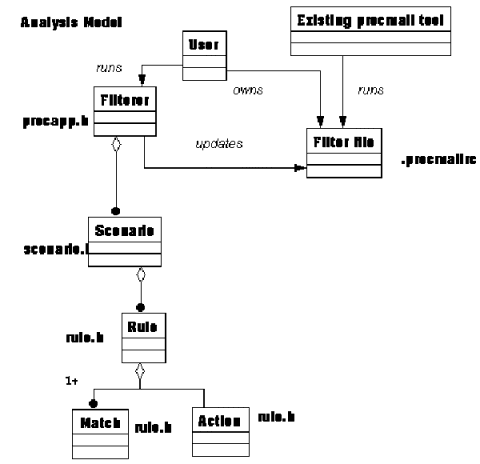
4.4. Design
Whilst Analysis is concerned with modelling objects in the problem domain, design is concerned with modelling objects in the solution domain. This solution domain includes all the semantic classes in the problem domain, but also adds classes dealing with "interface", "application" and "base/utility" [Monarchi92]. Design can also cause the classes identified during analysis to be redesigned or extended if abstractions are found.
Using the first iteration of the Analysis and Design method described in section 4.2, the meta-classes for "application", "interface" and "base" classes were added. The outcome of this stage is shown in the following diagram.
4.4.1. Overview design model
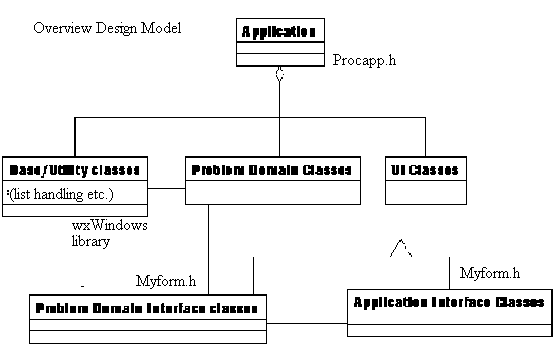
The advantage of separating the problem domain classes from Interface and Utility classes is that the Interface and Utility classes are likely to be much more dependent on the hardware or software platform used for the final implementation. As a result, by having implementation specific code in these classes, it becomes easier to swap these classes for other classes if the resulting application is to be ported to a different hardware or software platform. The implementation of the problem domain classes should be independent of the hardware or software platform chosen for the solution.
An interesting outcome of the overview design phase was that a 1-1-1 mapping emerged between many of the classes in the problem domain, the classes in the user interface domain and menu items and tool bar items in the application interface domain, as shown in the following table
4.4.2. Table of correspondences between design meta-classes
|
Problem domain class |
User Interface domain class |
Menu item |
|
Rule |
EditRule |
Rule |
|
Scenario |
EditScenario |
Scenario |
|
Rule Match Criteria |
EditRuleMat |
Called via "rule" menu |
|
Rule Actions |
EditRuleAct |
Called via "rule" menu |
|
Scenarios |
EditScenarios |
Scenario "list" option |
|
Rules |
EditRules |
Rule "list" option |
The second iteration of the OO A&D method detailed in section 4.2 resulted in the following two detailed design diagrams and the introduction of abstract classes such as "MyForm" to allow generic handling of forms for all input. The final iteration of the Analysis and Design method detailed in section 4.2 produced the detailed design diagrams that follow in sections 4.4.3 and 4.4.4.
4.4.3. Design model for problem domain and interface classes
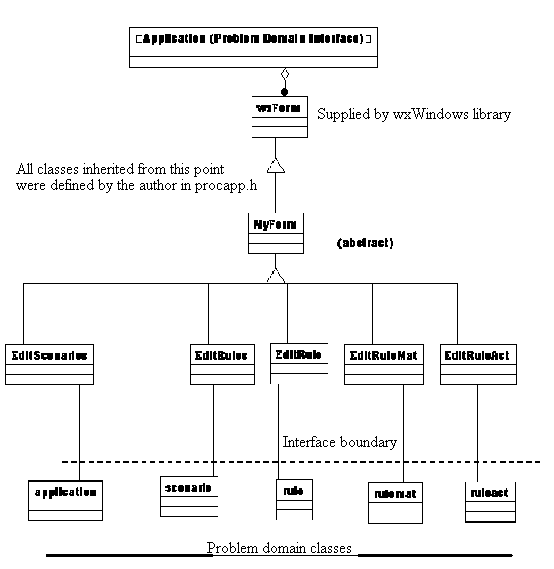
4.4.4. Design model for application interface classes
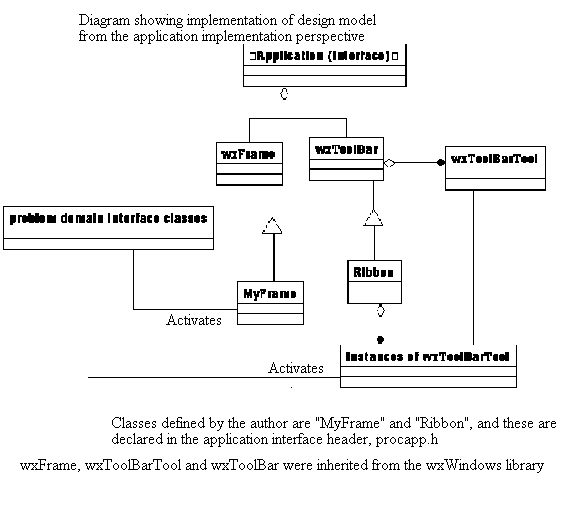
4.5. HCI aspects
Initial design of the user interface was achieved by testing various layout scenarios for the forms and menus on paper. These ideas formed the basis for the initial forms to be built into the first software prototype.
To design an effective user interface Alison Crerar, a lecturer in Human Computer Interfaces (HCI), was asked to take part in an expert walk-through of the first prototype on 16th December. This first prototype was available for evaluation approximately two weeks after coding started. It was considered important to obtain comments from a potential user as soon as possible to ensure that the interface was well designed from the user's point of view and provided suitable functionality.
The key points arising from this review are detailed in Appendix F together with the resolutions reached. Although Alison is highly knowledgeable about User Interfaces, she had never come across a mail filterer before and so she was representative of future users in the Department.
The original prototype was designed with the standard "File" menu on the menu bar. This was to try and present a consistent user interface for users who were already familiar with Windows applications. However, as a result of the review, this menu was changed to say "Scenario", as most of the functions on the menu were related to scenarios. Later in development, the few functions on this menu not connected with scenarios were moved onto the "Export/Quit" menu.
To fulfil the user requirements detailed in section 3.1, it had to be easy for the users to access the most frequently used match criteria and the most frequently used actions based on those criteria. As a result, predefined forms were designed for the main fields used for matching. These are "to", "from" and "subject". In these cases, the user only has to enter the text in a box next to the required field. These commonly used fields were placed near the top of the form so that the user notices them first. Next, a field was introduced which allows the users some flexibility. This is an open field that allows the users to specify the header item to match on and the header text. Although these are generally separated by a colon, there is no need for the user to remember to do this as one is automatically inserted by the application. This isolates the user from mail syntax that they should not need to learn. The most commonly used commands identified from [Mackay89] and the Departmental survey were placed at the top of the available actions list, to minimise effort spent scanning the list.
To implement the selection on MIME content was more difficult. As can be seen from Appendix L, there are 7 types, each subdivided into between 1 and 21 subtypes. The possible optimum solutions to this were to have a 7 way menu with different sized submenus or to have a 7 way type selector with the subtypes associated with that type dynamically updated in a subtype box. However, neither of these options was possible as menus could not be associated with a form and the form could only be updated when the user presses its "OK" button. So the solution was to have 7 subtype selection boxes, and then a type selection box which identifies the active subtype box.
A decision was made in the early stages of the project that the user should be isolated from the operating system as much as possible. This meant that operating system concepts such as filenames should not be presented to the user. The user is only concerned with being able to create data, store it and retrieve it reliably. Where the data is stored should be as well hidden as where a variable is stored in memory when a program is running. Any files which the user does not need to know about should be automatically created and manipulated by the application.
Another key concept introduced into the design were that the user should only have to use the minimum number of keystrokes necessary. This means that the user should not have to enter text unnecessarily. For instance, if the user wishes to have the action "move mail to folder" associated with a rule, then this should simply be selectable by clicking on a selection box and then accepting the selection. The only information that needs to be supplied is the name of the folder to move the message to, and so this is the only text that the user should have to supply, not the full "move to folder XYZ".
Although many people like applications to be mouse driven, many people including the author prefer windows applications that are usable without using the mouse. It is faster to press keys to activate a function than it is to move a mouse to a menu bar, select the menu bar, select an item from the menu and then move the mouse back to where it was. The application was therefore designed with the needs of such users in mind so that if users wanted to use a keyboard to select menu items, buttons or move between fields, then they would be free to do so.
It was important to make the system tolerant of user error. This means that the system should not crash or print an unhelpful error message if something goes wrong. Errors were designed so that they not only explain what has gone wrong, but also what the user should do to correct the problem. An example of error message follows:
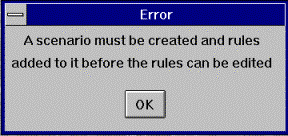
This error is displayed if the user tries to edit a rule when there are no scenarios and no rules available for editing.
Error messages are all placed on the centre of the screen for additional impact. They are also "modal", meaning that they need to be dismissed before the user can continue.
Other design considerations to make the system tolerant of user error include the use of "cancel" buttons on every form, so that if the user makes a mistake then it is easy to correct. The user should not feel intimidated by the application and should feel that it is safe to experiment. The most potentially "destructive" command in the application is "delete scenario" as this could include many rules and result in great loss of data. This command has additional checking and the user is prompted for confirmation before the scenario is deleted. The confirmation button for this command is placed some distance from where the mouse had to be to activate the deletion, and so this forces the user to move the mouse to the confirmation box and minimises the chance of accidentally pressing the "OK" button on "confirm delete".
The application was also designed so that information could be entered in any order wherever possible. This means that the user is not constrained to a particular way of working, and allows the choice of varying the use of the application and making the application more interesting. The application should attempt to guide the user and suggest suitable actions but these should not be enforced. For example, when a rule name is entered it is likely the match criteria and actions associated are likely to be specified next and so a pop up window automatically appears to allow the user to specify this information. However, it is not necessary to specify the information at this point, and so the pop up window can be dismissed if necessary.
Although it is an aim of the application to make users more productive in their work, it was realised that while the user is using the application they are not being productive at that particular moment. Therefore, the user should have to spend the minimum amount of time using the application. This means that the most frequently used actions should be accessible via a toolbar for speed. Also for speed, menu options should be greyed out and disabled if they are not applicable so that the user does not waste time trying out menu options which are not meaningful. Another useful way of minimising time spent using an application is to have an adaptive interface that guesses the command the user is likely to use next. This idea arose from attending an HCI seminar at Heriot-Watt University. Although this was considered a useful idea, it was felt that such an interface might restrict the way a person could use the program. A flexible solution would be to have a default next action displayed in the toolbar that would change with each command and which would be activated, if desired, simply by pressing a function key. However, there was not enough time to implement this.
Finally the total time for the user to perform some frequently used tasks should be minimised. To measure this, the author created a script using the application to move a mail message to a folder based on the recipient field. This was the most commonly cited rule in [Mackay89] and took the author 30 seconds to enter the information and save it to a file. This was felt to be a reasonable time to perform this action.
5. Implementation
During development, as much use was made of the wxWindows class library as possible. The hypertext documentation for this library was extremely useful and conforms well to suggested standards for OO library documentation [Samentinger93]. Use was made of existing classes for frame handling, forms handling, button pushes, list selection and tool bars. For the Base/Utility meta-class, mentioned in section 4.4, the list handling routines were used from the wxWindows library.
5.1. HCI aspects
Implementation of an effective user interface accounted for a large proportion of the project effort. Whilst wxWindows allows rapid prototyping, just as with Microsoft's Visual Basic, it is not the creating of a user interface which is the main problem, but the creation of a good user interface that is easy and logical to use, systematically laid out and allows the user as much flexibility as possible.
The following features were implemented to fulfil the objective of implementing a user-friendly interface.
i. On first entry to the application, it is possible that the user does not know how to get started. Therefore, a pop up help box is triggered after 15 seconds of inactivity to suggest to the user how to get started with the application. This help only appears if the user has not selected a menu item or browsed the toolbar. More experienced users are unlikely to see this pop up help and so it will not irritate them.
ii. The buttons on the toolbar were intentionally designed to be large. This not only helps people with co-ordination difficulties, but also those with faulty mice. Mice frequently develop problems that make control of the mouse pointer erratic, usually because dirt from the desktop has worked its way into the ball socket. Large toolbar buttons also mean that it is possible to annotate them with text. Many toolbars in applications such as Word for Windows do not have text on the toolbar items and the user has to remember what each of the toolbar buttons does. The idea for annotating the toolbar icons with text came from studying the user interface for Lotus cc:Mail V2.0, which has an advanced user interface.
iii. All the items on menus can be selected from the keyboard by their initial letter. This makes it easy for the user to locate and remember the key which will activate that command. In many applications, the shortcut key is located in the middle of the command and is sometimes difficult to find. In particular, the rules and scenarios menus have the same shortcut keys for the same commands, and were designed this way to make the interface more consistent. Before this final solution was arrived at, there were instances of two commands in the same menu having the same initial letter. In those cases, another consonant was chosen as the shortcut key as it seems the use of consonants and the start of syllables is more likely to make the command memorable. In Tony Buzan's "Major Memory System" [Buzan86], a scheme for remembering any number of items, it is consonants that are used as the key to the system.
iv. The toolbar was made coloured to make the application more visually appealing. Many toolbars (e.g. Word for Windows) only have grey toolbars. Unfortunately nothing could be done about the monotonous use of grey on all the forms. The "select" button was designed to resemble selecting a choice from a pull down menu.
v. The toolbar contains functions that are believed to be the most frequently used. This is intended to save the user having to use the menus. These toolbar buttons are grouped so that all the buttons applying to rules (add, delete, edit, view) are together. Having a button at the far left for adding a scenario seemed appropriate as this is usually the first operation that a user will perform. However, "add scenario" was later replaced with "select scenario" as the latter is likely to be used more often.
vi. The menus, sub-menu and toolbar conform to the 7 ± 2 model which appears to be the capacity of human short term memory. The menus were initially grouped differently and contained more items, but were reorganised to conform to this model. Commands with related or similar functionality have been grouped together.
vii. The menus relate to the objects in the system which the user encounters. The menu headings "scenarios" and "rules" correspond to the two main items in the system that the user has to specify. Because these items are given menus, they are easy to find. Each of these menus conforms to the standard practice of having a "create" option as the first item on the menu, like the "new" option in the "file" menu of many Windows applications.
viii. It is difficult for the user to accidentally lose or delete a lot of information. If data in the application has changed then the user is prompted for changes to be saved before the application finishes. The user is also prompted for confirmation when a scenario has been selected for deletion, as this could also contain a lot of data.
ix. It is difficult for the user to enter the "wrong" data, e.g. the rule actions are a selection list, and so it is impossible to choose an invalid action. Error checking is also performed on some functions to trap potential mistakes. When the user is moving a rule, the application displays the valid values that can be entered and generates an error if the user tries to move the rule to an invalid location. If the application generates an error of any kind, then this error must be dismissed by the user before further interaction with the application is allowed.
x. Extensive use is made of greying out menu bars and menu options if it is inappropriate to select one of these menu options. This helps to guide the user through the application and quickly show the user which commands are appropriate.
xi. The user is not unnecessarily constrained when using the application. Where it does not matter which order information is entered, then the user is free to enter the information in any order. It does not matter if the rule's actions are specified before the match criteria and the order in which the fields in a form are filled in does not matter. This concept give the user maximum freedom when using the application.
xii. The status bar with its multiple fields is designed to give the user information about what commands do, the command being executed, the current scenario and the current rule. This feedback is intended to help the user to navigate and understand the system.
xiii. Rules and scenarios were allowed to have normal, English names. This concept was taken from Lotus cc:Mail V2.0. In many applications, the user is unnecessarily restricted by the operating system to use a naming convention for saved objects according to rules imposed by the file system. In MS-DOS, files are restricted to eight characters and no spaces, and this is felt to be extremely restrictive. Therefore it was decided that if the rule is to be saved then it is up to the application to generate an appropriate name for the rule to be saved under, rather than forcing the user to use a less explanatory name for the rule.
xiv. The "delete" menu options were annotated with continuation dots to assure the user that additional information was required before anything was deleted. This means that the user is less likely to be worried about information being lost through accidentally executing these options.
The following items are considered weaknesses in the present system and would be improved if more time was available
i. Not all forms have the tab feature enabled and so require a mouse click to remove them. This restriction should be removed so that forms can be dismissed from the keyboard too.
ii. The buttons on the toolbar in the main application do not respond visually in the same way that many toolbar buttons simulate depression. This feature was not available in the version of wxWindows originally used, but became available in the December 93 release of wxWindows. Clicking buttons would be more consistent for users already used to toolbars.
iii. There is no undo facility. If the user accidentally deletes a rule, there is no way to get it back.
v. There is no on-line help. This is a major weakness, as it makes the users dependent on an expert for guidance on how to use the system. wxWindows does have the facility to incorporate hypertext-like help with the application, but there was not enough time to implement this.
vi. The input form for selecting the MIME field to match on is complicated, non standard and requires further work. Many solutions to this problem were considered, but the preferred option of choosing the MIME fields from menus was not available from an input form.
vii. It was often difficult to decide how forms should be presented and which wxWindows class to use to present information and choices on the screen. There were restrictions imposed by the available functionality that adversely affected the final implementation. The ideal solution for specifying the MIME types in the message to match on, would have involved having a panel with a dynamic "Subtype" box which was updated with relevant subtypes when the user browsed the "Types" box. However, dynamic panels were not permitted. This resulted in a complex implementation for this functionality.
5.1.1. Examples showing user interface
On first entry to the application, the following window is displayed.
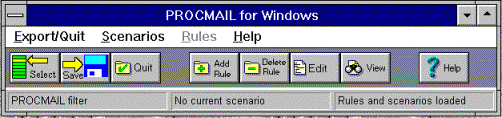
The rules menu is shaded out as it is not possible to manipulate rules unless a scenario exists which contains rules. Usually the first command a user will perform is to add a new scenario. For this reason, the first menu bar was titled "Export/Quit" so that the user does not associate this menu with entering data. Instead, they should use the Scenarios menu, and on selecting this menu the user is presented with only one option "Create Scenario" as the other options on this menu have been shaded out. The name "File" was not chosen for this menu, even though it is standard, as the concept of files and filenames was avoided as much as possible. If the user presses the "Select" toolbar button or any of the cluster of buttons associated with rules, these are invalid at this point and an error message is displayed to explain the problem and the correct course of action.
The diagram on the next page shows that multiple panels may be active at any one time. The user simply clicks on an active panel to bring it to the front of any other active panels. This diagram shows the forms presented when entering the match criteria and action associated with a rule called "file mail from Alison". To remind the user of the details that should be entered for the rule, the rule's name is shown on all panels. Note that the matches entered here are "ANDed", the action for this rule is only activated if all the match conditions are true. As mentioned in section 2.4.2, some filterers allow more complex Boolean logic, however there was not enough time to implement this.
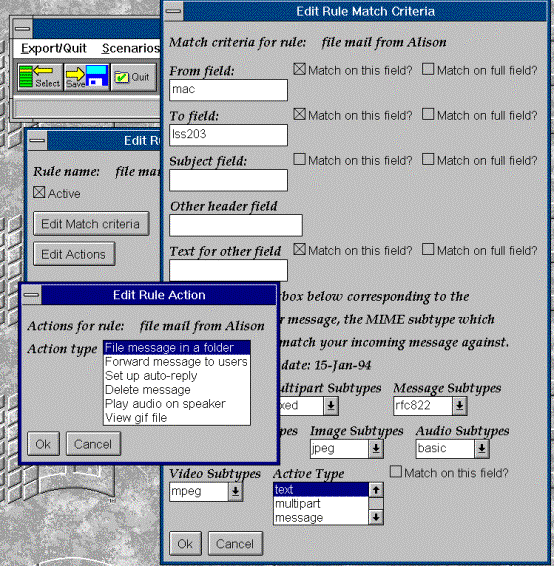
This diagram also shows that the "to", "from" and "subject" fields, which provide the source of 94% of the rules described in [Mackay89] have been implemented, thus fulfilling an aim to cater for the most frequently used functionality. However, an open field "Other header field" has also been implemented to give the application maximum flexibility. In Appendix E, it is shown in the discussion of item (2) under priority 3 functionality how this open field can be used to fulfil more complex user requirements. The "Edit Rule Action" box shows that all the user has to do to select an action is to click on the action and then dismiss the box using the "OK" or "Cancel" buttons. If the action requires additional information, such as a folder name to file to or a user name to forward the message to, then this is prompted for separately and only if required.
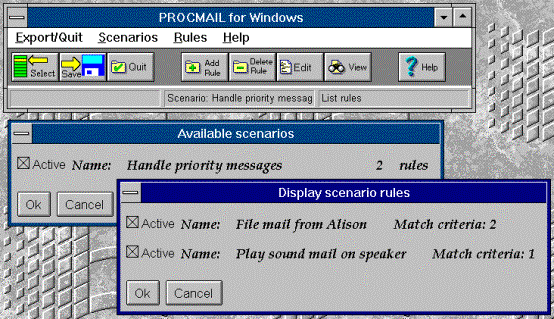
The following diagram illustrates the use of descriptive names for scenarios and rules and how it is easy for the user to activate and deactivate rules and scenarios simply by clicking on a check box. Another point to note from this diagram is that for panels which are likely to be displayed simultaneously, the placement of the various panels is such that the control buttons are always visible. This allows panels to be quickly dismissed in any order without having to first bring a background panel to the front.
5.2. Coding issues
This section discusses some of the main coding issues encountered during the project. The next section details the extent of reuse from existing programs, and the subsequent section discusses additional new code. Generally, code was implemented from the user interface "backwards". This meant that the menus and toolbars were implemented first, then the forms that those menus and toolbars display, then the functionality required to drive the forms and finally the output from the data in the program to printers and external files. This approach allowed the maximum flexibility in the design of the user interface, as it minimised any dependencies on underlying code.
5.2.1. Use of wxWindows demonstration programs
During the initial evaluation of wxWindows, the author compiled and ran the "hello" example program to confirm that wxWindows could provide the functionality required for the project. Having done this, the full wxWindows kit was copied over and installed it on a PC in the Department. The next step was to compile all the demonstration programs supplied with the kit to see in more detail the functionality that could be provided. This is an excellent way to evaluate a program as not only does it confirm that the functionality is indeed available, but as the source code is also available it is possible to see how difficult or easy the required code is to implement.
The sample program supplied called "test" was of particular interest as it implemented a toolbar and showed how the status bar at the bottom of the screen could be dynamically updated as the user moved the mouse across the items in the toolbar. This was felt to be a particularly useful feature. The test program was therefore chosen as the basis for the project, and some of the variable names used in procapp.cc such as "MyFrame" and "toolBarBitmaps" still remain from test.cc, although there is very little else remaining from the original "test" program. The first major change to the "test" program was to considerably enlarge the icons on the toolbar, this was done using Borland's Resource Workshop.
Next, the "hello" program was revisited and items from this examined for suitability. There was some forms handling in this program, but wxWindows has two interfaces to forms, a low level interface and a higher level interface. The "hello" program uses the low level method and although this was studied, it was not used. However, the "hello" program did provide examples of how to print diagrams, print to a postscript file and copy diagrams to the Windows clipboard. These were felt to be useful and were incorporated into the program, although the code in the "hello" example was designed for printing graphics implementations on a canvas and so these routines had to be extended to allow for text printing.
Finally, the short "form" example was incorporated. This example program showed how to call wxWindows high level forms interface. This program was the origin of the class "MyForm" in the project. Although the "form" example was very useful in showing how forms could be constructed, using this example in particular caused some of the biggest problems of the project. These problems held up progress for about a week. The problem was caused because the "form" demonstration program only handles one form and does so in a non-extensible way. Finding a way to solve this problem and make the code generic caused the redesign of the "MyForm" class so that it was abstract, and actual forms were created as subclasses of "MyForm". The solution to this problem came about when it was realised that no more than one instance of any one form should be visible at any one time.
5.2.2. Discussion of code
During the implementation phase (stage C of the author's Analysis and Design method), it became clear that optimisation of the Problem Domain Interface class structure was necessary. The abstract class "MyForm" shown in the diagram in section 4.4.3 resulted from seeing that the behaviour of the interface classes was identical. The common behaviour meant that this behaviour could be moved up the object hierarchy, implemented in an abstract class and shared across all the subclasses. The information regarding the content of the interface panels was however still specific to each panel. Therefore the panel content detail was implemented by the descendants of the abstract class "MyForm". See Appendix M for the code illustrating this solution. Only two of the declarations for the interface classes are shown in this sample, but it can be seen how the pattern can easily be extended to add additional forms to the application.
In the implementation of the forms, overloading was used to present a common interface for editing and creating objects of any kind. The following code sample from Myform.cc shows how the "Edit" function declared in the abstract class "MyForm" is overloaded by the subclasses to accept different kinds of objects.
//
// Rule list handling
//
void EditRules::Edit(wxList
*rules_to_edit)
{
if
(!InUse)
{
EditForm(rules_to_edit);
// Overloading with wxList
AssociatePanel(panel);
InUse
= TRUE;
};
panel->Show(TRUE);
}
//
// Rule action handling
//
void EditRuleAct::Edit(ruleact
*ruleactions_to_edit)
{
if
(!InUse)
{
EditForm(ruleactions_to_edit);//
Overloading with ruleact
AssociatePanel(panel);
InUse
= TRUE;
};
panel->Show(TRUE);
}
It can also be seen how this code can be easily extended to handle other types of objects. This repetitious code was, however, noted as a possible candidate for moving up the object hierarchy into the abstract MyForm class. This could be done as all the parameters passed to the Edit function are instances of "wxObject". However, this solution was not implemented due to lack of time. Instances like this of shared behaviour or attributes were regularly checked to see whether further optimisations could be made. One instance where changes were made as the result of repeating patterns was in the copy constructor, assignment operator and default constructor for many classes. There was a large amount of common code in these operations, particularly the copy constructor and assignment operator and so any common code was transferred to a common "CopyInit" routine.
Because of the close interaction between a class and its corresponding interface class the interface classes were made "friends" of the problem domain classes which they correspond to. The 1-1-1 interaction between application interface classes, problem domain interface classes and problem domain classes meant that the actions associated with menu items and toolbar objects were frequently bound to actions in the problem domain interface classes, as can be seen in the following code sample. Here the processing for adding a rule performs some error handling and then calls the EditRule function, which is a member of the problem domain class "scenario". This EditRule function in turn calls the problem domain interface class "EditRuleForm" so that the form is displayed for entering the required information.
case PROC_ADD: // User has chosen
"add rule" from menu or toolbar
{
if (!Application.current_scenario)
// No scenario open, so can't do
anything here
{
wxMessageBox(
"A
scenario must be created before\nrules can be added to it", "Error",wxOK);
frame->SetStatusText(
"Select NEW on
scenario menu",help_field);
}
else
// Add the rule
{
frame->SetStatusText("Adding
a new rule",info_field);
rule
*newrule = new rule();
Application.current_scenario->EditRule(newrule);
}
break;
} //
end of case for PROC_ADD
An important feature was to hide the constructors of certain objects so that these objects were initialised in a particular way. For the database class, a filename is required and so the user is forced to call the database constructor with a filename as a parameter. The default constructor is declared private. The following code sample shows that even if the user modifies the constructor to make it public, an error will still be generated.
database::database()
// The user can't see this constructor
as it's defined private
{
wxError("Database
constructor called incorrectly");
strcpy(FileName,"(undefined)");
stream
= NULL;
}
database::database(char *filnam)
{
strcpy(FileName,filnam);// Copy the
filename into the attribute
}
Another use of hiding constructors is to implement the aggregations shown in the diagram 4.3.1. As rule matches and rule actions cannot exist without a rule to contain them, then the constructors for these classes were made private. As both of these classes have rule as a "friend" class, then this meant that only the rule class could instantiate rule matches and actions. It would be very useful if a CASE tool could implement this rule automatically, so that by default the constructors in an aggregation were only accessible to the assembly class "holding" the aggregation.
To demonstrate how wxWindows can assist with creating pop up windows, here is the code which creates the window for specifying the actions associated with a rule. As all the generic forms handling is in the abstract MyForm class, the only code necessary here is the information specific to this form.
void
EditRuleAct::EditForm(ruleact *ruleactions_to_edit)
{
local_actions = ruleactions_to_edit;
panel->SetLabelFont(label_font);
panel->SetButtonFont(button_font);
Add(wxMakeFormMessage("Actions for
rule: "));
Add(wxMakeFormMessage(ruleactions_to_edit->GetName()));
Add(wxMakeFormNewLine());
Add(wxMakeFormString("Action
type",
&(ruleactions_to_edit->ActionName),
wxFORM_DEFAULT,
new wxList(
wxMakeConstraintStrings(
"File
message in a folder",
"Forward message to users",
"Set up
auto-reply",
"Delete
message",
"Play audio
on speaker",
"View gif
file",0)
,0),
NULL,NULL,200,140));
}
This separation of forms design and interface layout from the problem domain classes was felt to be particularly effective in managing the complexity of the problem and making the application as portable as possible.
5.3. C++ issues
During development a number of difficult C++ issues arose. Many of these were due to unfamiliarity with the language. Although the author has previously written two C++ programs (both as part of the LSSD course), these were much smaller and considerably less complex than this project. As a result, many C++ issues new to the author had to be understood and implemented as part of this project. The task of learning and implementing C++ was the most difficult task of the project. Many books available seem to teach only the syntax of the language, good programming style is much harder to learn. C++ is a difficult language to learn to use well, and it is particularly difficult to debug as it is not possible to simply look at the code and understand what is happening. The person debugging the program needs to know for example whether an "=" is an ordinary assignment or if it is an assignment operator defined further up the inheritance hierarchy. There is no way of knowing exactly what an "=" is doing except though having a complete understanding of the entire object hierarchy.
Although as much use was made as possible of encapsulation by having class attributes declared as "private" or "protected", this proved to be a hindrance to debugging. On occasions when data was corrupted, it was often useful to print out the data at various points in the program. However, the data was not always accessible to print as it was not always visible due to encapsulation. The only simple solution to this was to temporarily make the data "public" so that its status could be quickly checked from anywhere without having to write a member function to do this. It was necessary to remember to make the data protected again after debugging was finished.
The coding conventions used in the program are inconsistent and intentionally non-standard. The inconsistency is in the variable names, some are lower case, some a mixture and some have underscores. The reason for the inconsistency is that no coding standard was established before coding started, in hindsight it would have been useful to have had a coding standard before work started. The non-standard convention used is that the C syntax for variable declaration has been used instead of the C++ syntax favoured by Bjarne Stroustrup, the author of C++. A major problem arises with the use of the traditional C++ syntax for multiple variable declaration, thus:
char* x,y;
This declares x as a "char*" , but y as a "char". To the reader, it looks as if both variables are declared as "char*", but this is not the case. The author considers this form of declaration to be confusing, and so has used the C syntax:
char *x, *y;
instead. Authors of safety critical software commented in the comp.lang.c++ newsgroup that the C++ syntax is not allowed in many safety critical applications because it is potentially misleading.
In terms of class design, it emerged through discussions on the comp.lang.c++ newsgroup that well-designed classes should have the following four member functions defined:
i. A constructor
ii. A destructor
iii. A copy constructor
iv. An assignment operator
Defining these four functions explicitly for every class means that the class should be initialised correctly, deallocated correctly and if copies of the class are made then copies will be handled correctly, particularly if the class contains pointers. As a result, this strategy was designed into many of the classes in the application.
Finally, once coding was complete, the entire program was printed off and manually searched for obvious bugs. This traditional method of reviewing the code found several potential bugs, which were duly fixed.
6. Discussion
6.1. Major problems encountered
There were many major problems encountered during this project. Although it was often possible to work at other aspects of the project whilst a problem was affecting one area, there were a number of occasions where direct intervention had to occur, otherwise the end result would have been affected.
Here is a brief summary of some of the problems and a short description of how they were resolved.
i. Understanding Forms construction in wxWindows was a major difficulty, the examples did not provide enough information and the two examples in the wxWindows samples provided two separate implementations of how to write a form. This confused me, and it was only when I made all the forms in the program of the same type that the problem was solved. I originally did not want to do this, as it resulted in some loss of functionality.
ii. The mail connection between Napier University and the Internet was inadequate for the project. The mail connection was frequently prone to delays of several days. The mail problem was resolved by asking Neil Rumney, the local Postmaster to look into the problem every time I suspected something might be wrong. I verified mail problems by sending test messages to myself through various gateways. Sometimes when the mail problems got very bad, it was quicker to log into my account at Edinburgh University, send messages from there and read replies there instead.
iii. The FTP connection between Napier University and the Internet was also inadequate, as no actual FTP link was available. I was not allowed to have an account on the Computer Services machine for FTP, and the only way to transfer source kits to Napier University was to convert them to ASCII, split them into small amounts, mail them to Napier University and then reassemble them. This method was so time consuming and prone to error that frequent trips were made to Edinburgh University where files were downloaded by FTP onto floppy disks. The floppy disks were then taken to Napier University and the files uploaded from there. This method was much faster, although some files were too big to fit on one floppy disk and so a tool was found and used to split large files across more than one disk.
iv. Getting procmail working was held up due to a bug in one of the example programs in the procmail manual pages. This problem was resolved by asking on the procmail-users' mailing list about the problem.
v. The disk holding user files on the Sun at Napier University was unavailable for three days in December due to hardware problems, and so my old mail was inaccessible. This meant I could not refer to messages which contained useful information. Fortunately I had taken a backup of my mail folder, but this backup was a few weeks old.
vi. The Borland debugger and debugging facilities in general are totally inadequate for debugging C++, particularly in a Windows environment. The debugger is DOS based, which means that when the debugger is active, you cannot see the application itself. It also seemed impossible to get the debugger to display source code. After asking C++ experts in the Department, and in newsgroups and on mailing lists the conclusion was that my application was too big because of the libraries it was using. However, in January, completely by accident, I found a means of displaying the source line where a crash had occurred. Before this, the only way of debugging programs was to insert "cout" statements in the code.
vii. When the program was having problems with not freeing up allocated memory, there were no tools available to help to pin down where this memory was being allocated or what the structures were which were allocated. The only way to resolve this was to look through the code and study areas where memory was allocated. There is still a small memory leak in the program, but due to the lack of a tool to detect memory leaks and the poor debugger, it was felt to be better to live with this solution than to risk fatal crashes.
viii. A declaration of a variable caused the application to crash before executing the first line of code. This was caused by the variable being placed by wxWindows onto a stack and because the variable was not a pointer, it was causing wxWindows to crash before the procmail application could start. This bug was particularly difficult to trace as it did not seem to be in my code. There was also little support to help trace the possible cause as the bug occurred over Christmas when most people were on holiday. The solution was found by inserting print statements into the wxWindows initialisation source code and recompiling wxWindows to see where the crash was.
ix. The attempt to integrate the tool with the OO database POET was highly unproductive. POET is not a full C++ compiler therefore some Borland and wxWindows header files with valid C++ were rejected by the POET pre-compiler. POET's errors were totally unhelpful, (e.g. "Linker Error -2003") and provided no information on how bugs could be traced. The Department is also running an old version of POET (the current version is 2.1), and the version in the Department is known to have bugs. Running POET on my machine at home caused POET to crash and left a corrupted file. This corrupted file meant that no further compilations could take place until the disk had been fixed by a repair tool. The whole experience of using POET was so unsatisfactory that it was decided not to use POET, even though having persistent rules and scenarios was considered to be important. The code was modified so that all database functionality was moved to a database class. This meant that integrating a database later would be easier.
x. Because MS-DOS filenames are incompatible with procmail's resource filename (.procmailrc) a method had to be found of making the procmail files more accessible to DOS. This was accomplished by having a .procmailrc file which called a rules.txt file, and the rules.txt file could easily be manipulated by DOS and copied by the File Manager in Windows.
xi. The nature of the project changed as the project developed. Firstly it was "port Pine to windows" then it was "write a filterer specifically for Pine" then it was "write a generic filterer". These changes held up the start of the project.
xii. Major problems were encountered trying to draw the analysis and design diagrams in a format suitable for inclusion in this document. There was no direct way of exporting the diagrams created in OMTool into Word for Windows.
xiii. There were restrictions imposed by the wxWindows library which caused problems. One of these problems was that buttons on a pop up panel could not be bound to a class's member function. The functions associated with panel buttons have to be global, and so a work around was devised whereby a global button function called the member function instead. It was suggested to the wxWindows developer, Julian Smart, that this restriction should be removed as it breaks encapsulation.
6.2. Evaluation of achievement
Evaluation of the project was achieved by measuring the project outcomes against the aims stated in section 1.1
The aim of carrying out research on mail filtering was carried out by extensively researching existing tools via the Internet, through magazines, through receiving a demonstration copy of Lotus cc:Mail and through material such as [Mackay89]. This knowledge was combined with previous knowledge of mail filterers such as Deliver [ER3] to assess the current features of mail filterers and the recent trends in their development. It is clear that mail filterers are now regarded as highly desirable in any commercial mail product, that filterers are becoming a more integral part of mail products and that the interface for filterers is becoming more user friendly.
Research on mail tools that support MIME was carried out by locating and studying an M.Sc. thesis on Multi-Media mail systems [Magnus92], by obtaining and studying and evaluating the 17 free MIME mailers detailed in the comp.mail.mime FAQ [ER9]. Further study was accomplished by implementing Pine at Napier University as a MIME based reader and composer. Towards the end of the project a primitive MIME based system (ELM+Metamail) [ER15] was installed on the author's own PC. This system can read but cannot compose MIME messages.
The third aim was to use a MIME based mail tool and a traditional mail filterer to implement a new prototype filterer capable of supporting MIME. This was carried out using Pine as the mail tool and procmail as the mail filterer. The resulting application, although a prototype, is successfully being used by the author to process messages.
The next aim of making sure the application met the needs of users in terms of functionality and usability was achieved by conducting a survey in the Department on expected functionality and by studying papers such as [Mackay89] which detail the rules used by existing users. Unfortunately, the return sample from the Departmental survey was low and the results are difficult to assess as a result, particularly as the people surveyed had never used a mail filterer before and may not even have heard of one. Appendix E shows however, that 13 of the 16 requirements arising from the survey have been implemented. The author feels though, that the application badly needs integrated with an Object Oriented database so that rules can be stored. Unfortunately there was insufficient time to implement this due to problems encountered with using POET. The application is also likely to need additional functionality once users become familiar with the product. This would include more complex Boolean matching, the ability to match on exact strings rather than subsets and the ability to run rules on mail that is already in a user's mail file.
In terms of usability, more work is necessary here, the application has had one expert walk through and 10 of the 18 issues [Appendix F] were implemented as suggested. Some of the remaining 8 issues are no longer applicable. Some usability measurements were taken by the author to assess the time taken to create and store rules, but a full usability study by users in the Department is now necessary for a full evaluation of the product. The application would need on-line help added before being issued to users.
The final aim of applying the skills learnt during the M.Sc. to a large Software Development project and to research and solve problems associated with implementing Object Orientation was implemented by writing the application, a 3,000 line program. As part of the research into object orientation, considerable information was found on the weaknesses of some OO analysis and design methods, and these were addressed during this project by devising an alternative OO analysis and design method that was used for development. Many problems were encountered and solved during this project, the first large program the author has written under the OO paradigm. The solution implemented is original, there is believed to be no other user-friendly mime-based mail filterer available. The filterer has the additional benefits of being easily portable to the X environment, and as all the procmail specific commands are in common "Write" functions, it would be easy to convert the application to generate code for other mail filterers. This could have been made easier by transferring all the procmail specific code to one class, but this has not been implemented yet. Another weakness in the code is that more effective use could have been made of template classes and functions, particularly as the functionality for rules and scenarios is so similar. Considerable attempts were made to use template functions for the similar methods in the rules and scenarios classes, but these were abandoned after several days of frustrating problems with getting the application to link.
The work in this application is felt to be pioneering. There have been several strands of development taking place which include MIME based mail systems (e.g. Pine), filtering systems (e.g. procmail), user friendly mail systems (e.g. cc:Mail) and elementary processing of MIME mail (e.g. Metamail). This project attempts to integrate these four technology strands into one application. Related work is this area is discussed in section 6.4.2.
6.3. Major Outcomes
This section reviews the major outcomes resulting from the project, besides the project aims.
6.3.1. Departmental outcomes
The main outcomes for the Department are as follows:
i. The Department now has a prototype application that provides users with a simple graphical interface and which can help them to manage their mail. The application has generated scripts that have successfully executed and performed actions with mail messages.
ii. As a result of Pine being installed, the Department now has a user friendly mail system for the first time. Word of Pine has spread rapidly, and many users are now using Pine as their mail tool. This has encouraged users who have never used mail before to start using mail much more easily than was possible with previous tools.
iii. The Department is able, via Pine, to use MIME based mail for the first time. During the requirements analysis phase of the project, it was mentioned that the Department needed a system for exchanging documents for Microsoft's Word for Windows easily. Such functionality was not part of the project, but as a result of Pine being installed, it is now easy for staff and students in the Department to exchange documents in any format. Pine is also compatible with MIME based usenet news and so this will allow a common interface to the Department for both mail and news when news is installed later this year.
iv. As Napier University does not have FTP access to the Internet, it was previously difficult to share and receive non-text files with people outside the University. This is now possible via Pine. Images, word processing documents, slides, screen dumps and many other items can simply be mailed to any other MIME user on the Internet.
v. With the introduction of procmail, there is now a powerful mail filterer available for anyone who wishes to explore issues of mail filtering further. As research has shown that mail filterers are now almost standard in commercial mail systems, a mail filterer appears to be a key development which the Department should be aware of and be given the opportunity to learn about.
vi. wxWindows has provided the Department with a tool that could be considered for use with student assignments or if an application was required which was required to run on both the Departmental PCs and the Suns with the minimum of rewriting effort.
6.3.2. Personal outcomes
i. The author has used the application for a practical use. A script created by the application tells people who send mail to his old account at Napier University that he has now left the University and what his new mail address is. The application generates an auto reply for each message received on the old account and sends it to the originator, thus saving the author from having to do it manually. The script then forwards the message to the author's new address, thus saving him from having to log into Napier University to check for mail.
ii. The abstract of this project has been submitted to a conference (Groupware '94, San Jose, August 1994), is currently being considered.
iii. The author has corresponded with the editor of a new journal (International Journal of Applied Software Technology, first edition Autumn 1994) who is interested in receiving an article for the journal about the project.
iv. As the result of mentioning the project on usenet and on mailing lists, five requests have been received for the project and report to be made available on the Internet for others to read.
v. The author has learnt a considerable amount about writing code in C++ and considers this to be of great practical value when seeking employment after the course finishes.
vi. Having gained experience implementing a GUI for OO code, and in particular seeing the 1-1-1 correspondence set up between problem domain classes, UI classes and application interface classes (section 4.4.2), the author was able to help others on the Internet who were asking for details of experiences and knowledge in this subject.
6.4. Future Directions
6.4.1. Development of Application
Although the application can currently generate working code, it has some weaknesses that should be addressed if the product is to be widely used in the Department. These issues include:
i. Adding persistent storage for the rules and scenarios so that the user does not have to enter details of rules and scenarios each time the program is run. This could be achieved by using the existing "database" class to mimic a simple OO database, or instead the application could be integrated with a commercial OO database such as POET.
ii. It would be useful to port the application to the X environment so that users who do not have PCs can access the application from workstations. This work is estimated to take 2-3 weeks, as the code has been written in wxWindows and this environment is readily portable to X.
iii. The application would benefit from integration with a tool that is able to split multi-media messages into separate components. This would allow filtering based on the components of a mail message rather than the whole mail message. Such a facility would allow, say, the text component of a mail message to be forwarded to other users who are not able to display graphics or sound on their machines.
iv. Because of the incompatibility between UNIX files and MS-DOS files, the scripts generated by the application need to be converted to UNIX format by passing them through the Unix2dos utility. Details of how to do this are documented in the user documentation section (Appendix A).
6.4.2. Filtering trends
After the research period of this product was over, the author stopped asking many questions on usenet news, but continued to use usenet as a way of monitoring trends and announcements in the industry.
During this time, the following developments in the field of information filtering occurred.
i. On 6th January 94, General Magic (a company that has a personal notebook product similar to the Apple Newton) announced the Telescript "intelligent agent". Details of Telescript are difficult to find, but an article on the software appears in [Tebbutt94]. Telescript is an interpreted language in which the user writes commands in a script. The script is then sent out to many machines, and the machines perform local searches based on rules in the script. This means that the filtering of information is performed remotely. Contact with General Magic suggested that products incorporating Telescript are not expected until the second half of 1994. Products using Telescript are expected from AT&T, Motorola and Sony.
ii. The author of the MIME draft protocol, Nathaniel Borenstein is working on a system which is very likely to compete with Telescript. This system, called Enabled Mail allows scripts to be written in a systems language called Tool Command Language. Enabled mail allows commands to be embedded within a mail message and for these commands to be executed when the message is received or displayed. Like Telescript, both of these systems have a secure environment that cannot result in the spread of viruses. A working draft of the enabled mail specification is available in [ER12].
iii. On 3rd February 94, a usenet news filtering service was launched by Stanford University. This service allows users to write a profile which specifies topics that they are interested in. The service then regularly searches news groups for articles matching the search criteria and mails users with articles matching the topics of interest. More information is available in [ER13].
Enabled Mail and Telescript are potentially a lot more versatile than a local mail filterer, but both pose security problems. The syntax for Enabled Mail is not user friendly and requires learning another language. Enabled Mail and Telescript operate on a different principle to a mail filterer. Control of Enabled Mail and Telescript message processing is not with the recipient, but with the sender of the message. The Enabled Mail and Telescript languages are most suitable for remote program execution and not for the general handling of all mail and news. A mail filter may be complementary with these script languages, allowing some control over message processing to remain with the recipient.
6.4.3. MIME and Industry trends
With the arrival of multi-media mail, it seems that the distinction between traditional text based mail systems and other forms of communication is set to diminish. There are now applications that can integrate MIME based messages with other communication devices such as a telephone. The PhoneStation application [ER14] integrated with a MIME based filterer, such as the one detailed here can offer to call the recipient on the telephone and play the audio portions of a mail message. This is particularly useful if the recipient's computer does not have a loudspeaker.
6.5. Summary
It is hoped that this report can provide the Department and others with a guide to the latest trends in mail technology and some of the benefits of MIME filtering. It is also hoped that the program can provide an easy to use and useful means for members of the Department to experiment with mail filtering and the possibilities it offers. The author has learnt a great deal during this project in many different areas and hopes that this report conveys some of the knowledge gained in a way that will help others to continue this work.
The author feels that MIME based mail offers many exciting possibilities for future research and development. As sound, graphics and other forms of communication become increasingly common in mail, so mail itself will start to seem less like a computer application and more like a tool which allows non-computer users to communicate like a telephone or television without worrying about the underlying technology.
As an example, a user can now easily create a mail message containing a sound message and send it to another user anywhere on the Internet, usually for free. By installing an application like the one in this project on the recipient's system, the incoming sound message can be stored or played immediately depending on what rules the recipient has created. The two people can then use the automatic playing of sound messages in mail like a telephone, except the sound is being transmitted at low cost over the Internet rather than the telephone network. As networks increase in capacity, so it may become possible to have spoken conversations via MIME mail and mail filterers without the network delays experienced today. There is no reason why the interface to a dedicated sound based MIME mailer could not be an ordinary telephone, allowing asynchronous voice-based world-wide communication at low cost. The author is currently drafting a business plan to investigate the feasibility of such a scheme.
It is hoped that this project makes MIME based filtering more accessible to non-technical users and assists those who wish to work towards developing user-friendly, automatic, multi-media communications systems.
7. References
Because of the nature of this project, a large number of references were found on-line, therefore references have been divided into electronic references and other references. Electronic references are listed first, and printed references follow. Unfortunately, the electronic sources of information are liable to change. Where no exact location is given for an electronic reference, the location may be found by using the "archie" Internet utility, described in [Hahn94]. Electronic locations and E-mail addresses are given in fixed font courier to minimise the risk of transcription errors.
Electronic references
[ER1] The draft MIME standard is defined in two Request For Comments
papers (RFCs), RFC1521 and RFC1522. RFC1522 is concerned with the
representation of non-ASCII text in message headers and is not relevant to this
paper. RFCs are available from the FTP
location:
ds.internic.net: rfc/*
[ER3] Deliver. A filterer which only operates on VMS. Free and
available at many FTP sites. Runs only on VAX/VMS. Provides Boolean logic
matching based on a mail message's from, to and subject fields. These are the
only fields used in VAX mail.
[ER4] Dave Taylor. The Elm
Filter System Guide, V2.3. Available at many FTP sites. Contact E-mail addresses: taylor@hplabs.hp.com or elm@dsi.com
[ER5] Lotus cc:Mail. Available from Lotus Corporation (0753) 532044.
Free demonstration disk available from Lotus, full product £360 for 10 users.
Rules were introduced in V2.0.
[ER6] The Andrew Message System. At the time of writing, most of the
articles on this system are available by anonymous FTP from emsworth.andrew.cmu.edu in the directory /papers
[ER7] Brian Reid's (reid@decwrl.dec.com) monthly posting to news.groups of network use.
[ER8] The HCI Bibliography database can be reached via Electronic mail
at hcibib@rumpus.colorado.edu. Send a blank message to that address to find out how to use the
system.
[ER9] Like many Frequently Asked Questions (FAQs) the comp.mail.mime
FAQ is available by anonymous FTP from rtfm.mit.edu: The
directory is /pub/usenet-by-group/comp-mail-mime Filename: c.m.m_f_a_q_l_(F)_(x_3), where x = 1, 2 or 3 (the FAQ is in three parts).
[ER10] R.J. Wieringa et al. OMTROLL - Object Modeling in TROLL. Unpublished
work. Authors can be contacted at: roelw@cs.vu.nl or {jungclau|hartel|hartmann|saake}
@idb.cs.tu-bs.de
[ER11] A free card
summarising the Booch notation can be obtained by sending your address in a
mail message to: booch-card@rational.com
[ER12] Marshall T. Rose and
Nathaniel Borenstein. A Model for Enabled
Mail (EM). Currently a working draft. Latest version is dated 19-Nov-93 and
is available from the authors at mrose@dbc.mtview.ca.us or nsb@bellcore.com
[ER13] Tak Woon Yan. Netnews Filtering Service. Send a mail
message to netnews@db.stanford.edu for more information.
[ER14] PhoneStation is available by anonymous FTP from the site flash.bellcore.com in the directory /pub/PhoneStation
[ER15] Metamail is available by anonymous FTP from thumper.bellcore.com:/pub/nsb
Hardcopy references
[Booch94] Grady Booch. Object-Oriented Analysis and Design with Applications, 2nd ed. Benjamin/Cummings 1994.
[Brynjolfsson93] Erik
Brynjolfsson. The Productivity Paradox of
Information Technology. Communications of the ACM, Vol 36 No. 12, P75 Dec
93
[Buzan86] Tony Buzan. Use your memory. BBC Books. P87. 1986
[Coad92] Peter Coad. Object Oriented Patterns. Communications of the ACM, Vol. 35, No.
9. P152-159. Sep. 92
[Collin94] Simon Collin. The Ideal Mail. Personal Computer World, P474-483. Jan 1994
[Constant93] David Constant. The Productivity Paradox: Why hasn't Information Technology fulfilled
its promise? SIGCHI Bulletin, ACM
Press, Vol. 25 No. 4, P42. Oct 93.
[Dix93] Alan Dix et al Human Computer Interaction Prentice Hall. P430. 1993
[D'Souza93] Desmond D'Souza. Working with OMT. Journal of Object Oriented Programming, October
93, P63-65
[Hahn94] Harley Hahn and Rick Stout. The Internet Complete Reference. Osborne
McGraw-Hill. 1994
[Hayes91] Fiona Hayes, Derek Coleman. Coherent Models for Object Oriented Analysis.
OOPSLA '91 Proceedings, ACM Press. P171-183
[Henderson-Sellers93] B.
Henderson-Sellers et al. The O-O-O
methodology for the object-oriented life cycle. ACM Software Engineering
Notes, Vol 18 No. 4 P54-60. Oct 93.
[Lindholm93] Kristina A. Lindholm. Commercial products for CSCW: A Panel report
from CSCW '92. SIGCHI Bulletin, Vol. 25, No. 4, ACM press. P45-47. Oct 93
[Mackay89] Wendy E. Mackay et al. How do
Experienced Information Lens Users Use Rules? Proceedings of the 1989 conference on Computer Human Interaction, 211-216. ACM press. 1989.
[Magnus92] Magnus Hedberg. Multimedia mail systems: Asynchronous Computer Supported Cooperative
Work. M.Sc. thesis, Luleå University, Sweden.
E-mail: Magnus.Hedberg@ludd.luth.se
[Malone87a] The Information Lens (T.W. Malone et al.
ACM Transactions on Office Information
Systems, 5(2), P115-131). 1987
[Malone87b] T.W. Malone et al. Intelligent
Information-Sharing Systems. Communications
of the ACM, 30, P484-497. 1987
[Monarchi92] David E.
Monarchi and Gretchen I. Puhr. A Research Typology for Object-Oriented Analysis
and Design. Communications of the ACM. Vol
35, No. 9. P35-47. Sep 92.
[Pope94] Ivan Pope. Chronicling the Global Networks. BCS HCI Newsletter No.23 Winter
93-94.
[Press93] Larry Press. The Internet and
Interactive Television. Communications of
the ACM. Vol. 36, No. 12. P19-23. Dec 93
[Rumbaugh91] James Rumbaugh et al. Object-Oriented Modeling and Design. Prentice-Hall, Inc. 1991.
[Samentinger93] J. Samentinger, A. Stritzinger. A documentation scheme for Object-Oriented
Software Systems. OOPS Messenger, Vol. 4, No. 3, July 1993. P6-17
[Tebbutt94] David Tebbutt. How to filter junk E-mail. Computer Weekly, 3-Feb-94 P22
Appendices
A. User Documentation
1. Installation
The program is supplied on a 3.5" disk formatted to High Density and suitable for IBM-PC compatibles.
Full installation instructions are supplied with the software. To view the instructions, insert the disk into your A: drive and view the directory of the A: drive using the file manager. Doubling clicking on the file "readme.bat" will automatically display the installation instructions. If you wish to print off the installation instructions, then you need to load the file "install.txt" into the notepad utility and print them from there.
It is essential that the directory c:\procmail exists, otherwise the program will crash and the mouse pointer will disappear. If this happens, then it is necessary to restart Windows to reload the mouse driver. This can be done by using ALT+SPACE to bring up a pop-up menu, switching to the Program Manager and selecting the "Close" option. Then press return, and at the MS-DOS prompt, type "win".
2. First time use
The first time you use the application, there are a number of things you have to do. These unfortunately cannot be done automatically as the filenames are inaccessible to MS-DOS.
1) Create a file called forward in your login directory on the Sun. In this file, place the following line followed by a carriage return:
"|IFS=' ';exec /usr/local/bin/procmail"
^ This is the "pipe" symbol.
2) When you run procmail.exe for the first time, the application will create a file in
C:\PROCMAIL called procmail.rc
copy this file to your login area on the Sun and rename it to be .procmailrc
3) When you have finished defining rules and have generated some rules for the application to run, save them by calling the menu option under "Export" called "Generate procmail code". This creates a file called "rules.txt" that you can view with the notepad. Copy this file (you can use the File Manager) to the directory ~\procmail\rules.txt on the Sun, where "~" is your login directory.
Now, to activate procmail, log into the Sun and rename the file "forward" in your login area to ".forward". To disable procmail, just rename it back.
To invoke Pine to send and receive MIME messages, simply type "Pine" at the UNIX prompt.
If you suspect that procmail is not working as expected, then have a look at the file "fromlog" in your login area. This is a record of the actions procmail has performed and any errors generated.
3. Subsequent use
The user will normally select the "Create Scenario" menu option from the "Scenarios" menu to create a new scenario. Once the name of the scenario has been entered, rules may be added to the scenario. To add a rule, the user selects the "Create Rule" option from the "Rules" menu. When the name of the rule has been entered, a panel is displayed showing two buttons that should be activated via the mouse to display the panels used for entering the match criteria for the rule and the actions associated with the rule. Once the rule match criteria has been entered, the panel is removed by selecting its "OK" button. To specify the action associated with the rule, click on the "Edit Actions" button of the "Edit Rule" pop up. Only one action may be selected from the actions presented. When the action has been selected, select "OK" to remove the panel, and then "OK" on the "Edit Rule" panel to finish creating the rule. The rule is now stored in the application.
The user repeats this process, adding rules to the current scenario and adding new scenarios until all the required rules have been entered. The scenarios and rules can be viewed by selecting the "List Scenarios" option from the Scenarios menu or the "List Rules" from the rules menu. As scenarios and rules are enabled by default, the user can disable rules and scenarios via these pop up displays if necessary.
When the user is ready to run the application, the user selects the "Generate Procmail Code" option from the "Export" menu. This creates a file called C:\PROCMAIL\RULES.TXT that should be copied to the user's account on UNIX. This copy can be done via the file manager. The RULES.TXT file must be copied to the PROCMAIL directory off the user's login directory and be called RULES.TXT.
Unfortunately due to an incompatibility between MS-DOS files and UNIX files, the files must be converted to UNIX file format before they can be executed by procmail. This is done by entering the following two commands on UNIX from the user's login directory
dos2unix .procmailrc .procmailrc
dos2unix procmail/rules.txt procmail/rules.txt
The rules will then be invoked when the user next receives a mail message.
The dos2unix utility could be incorporated in a future version of the application so that this conversion takes place automatically.
B Description of program menu items
The menu at the top of the main window shows the items:
Export/Quit Scenarios Rules Help
These menus are further subdivided as follows:
Export/Quit
Save rules and scenarios
Generate procmail code
Print to printer
Print to file
Print to postscript file
Copy scenario to clipboard
Finish using the program
Scenarios
Create scenario
Delete a scenario...
Select scenario
List scenarios
Run active scenarios
Rules
Create a rule
Delete a rule
Edit a rule
List rules
Move rules
Help
Index
About
Details of what each of these menu items do are described below:
Save rules and
scenarios
This calls the prototype database handler to save the data of rules and scenarios
to a format that can be used between program runs. However, as there is no
database, this code does not store anything yet.
Generate
procmail code
This creates the script file which procmail runs. Calling this command creates a
rules.txt file which you copy to your UNIX account
Print to
printer
This calls a prototype function to output some information about the current
scenario on a printer. The output contains the current scenario's name and the
number of
rules in it. This could easily be extended to include other information.
Print to file
This function is intended to print the output as plain text to a file, but has not
been implemented yet.
Print to postscript
file
Outputs the same as "Print to printer" except the output is in postscript format.
The user is prompted for the filename via a standard dialog box
Copy scenario
to clipboard
Outputs the same as "Print to printer" except sends the output to the windows
clipboard. The output may be viewed from the clipboard application.
Finish using
the program
Exit the program. The user is prompted if there are changes to save. The options presented are YES (save the data and exit), NO (exit and do not save the data) and CANCEL (do not exit). However, no data is actually saved as there is no persistent storage yet. The local copy of the procmail script in c:\procmail\rules.txt is automatically updated however.
Create
scenario
The user is prompted for the name of a new scenario, to which rules may be added
Delete a
scenario...
The user is presented with a list of scenarios. The user can then delete one of
these, or cancel.
Select
scenario
This allows the user to change scenarios. Changing the scenario allows the user
to add, delete, move, edit and display rules in that scenario
List scenarios
Displays the names of all scenarios which have been defined and the number of
rules in them. Allows the user to quickly activate and deactivate scenarios by
toggling the active box. Note that if a scenario is active, then the rules in that
scenario are only active if their active flag is toggled on. If a scenario is not
active, then all the rules in that scenario are also inactive, irrespective of their
active status.
Run active
scenarios
This function has not been implemented yet. The intention was to get procmail
to run itself on mail which had already arrived in the user's mailbox. A script
is available to do this, but it is complicated and there was not enough time to implement it.
Create a rule
Prompts the user for the name of a new rule. Once the name has been specified
then the user is prompted for the match criteria and actions associated with the
rule
Delete a rule
Allows the user to delete rules from the current scenario.
Edit a rule
Presents a list of rules in the current scenario and allows the user to select
one so that the match criteria and actions may be modified
List rules
Presents a
list of rules in the current scenario with a list of the number of match criteria each rule has. The rules
can be toggled on and off from this option.
Move rules
Allows the user to change the order of rules within a scenario. A list of the
rules is presented, the user selects one and then enters a number to represent
the rules new position. Valid positions are 1 to N where N is the number of
rules in the scenario. Numbers out of this range are rejected.
Index
Calls the prototype help, this simply says that there is no help yet. Instructions
on how to use the program are detailed in this report.
About
Bring up the overview "about" box, giving details of the application.
C Sample program output
This appendix shows some procmail code that the program has generated and which the author uses to process his mail. Text in courier font was generated by the program. Text in this font is to aid with understanding the output.
# File created by Procmail for Windows
at Tue Feb 08 20:45:21 1994
#
#
Procmail rules for scenario called : Leaving Napier
#
#
Generated from a rule called : Reply to personal mail
The following line says that there is 1 counted match criteria in the rule. In this case, the match criterion is everything addressed personally to "lss203". The "TO" in upper case is a macro that is expanded by procmail and which covers many different cases besides the obvious one of "To: lss203"
:1 c:procmail.lock
^TOlss203*
This next line is an uncounted rule, as it starts with a "*". This match criterion says to exclude (the "!" is a NOT operator) anything which looks as if it came from a mailer daemon or postmaster. This prevents auto-replying to bounced mail and errors.
* !^FROM_DAEMON
Here is the actual line that does the work. This says: pipe
the header from the mail message just received and send it through procmail's
utility "formail" using the reply mechanism (this generates the reply
header). Then "cat" the file in the user's "away.txt" into
the new message which has the reply header. Then pipe the resulting mail
message to the utility pointed to by the $sendmail macro. This delivers the
message.
|(formail -r; /usr/bin/cat
$MAILDIR/procmail/away.txt) | $SENDMAIL -t
#
#
#
Generated from a rule called : Bin mass distribution
:1 c:procmail.lock
This rule uses the "open" field in the "match
rule criteria" form to specify that all incoming mail which has a header
containing "precedence: bulk" should be automatically deleted. Most
mail from mailing lists and from automatic mail generators such as list
monitoring software has this field.
^precedence:.*bulk*
/dev/null
#
#
#
Generated from a rule called : Forward to home address
:0 c:procmail.lock
This rule takes any mail which is has not been deleted yet
and forwards it to the author's mail address at home.
! craig@scot.demon.co.uk
D Project Schedule
Date Deliverable
22nd Oct Agree project
26th Oct Plan issues for Seattle trip, talking to Pine developers
27th Oct-5th Nov Seattle + holiday
5th Nov-30th Nov Obtain, install, get working and understand procmail, wxWindows and Pine. Start work on demo.
10th Dec Demo available for Alison
14th Dec Perform analysis and design for 2nd prototype
17th Dec Incorporated Alison's changes
22nd Dec Demonstrate 2nd prototype
24th Dec Agreed changes to 2nd prototype finalised
28th Dec Perform analysis and design for 3rd prototype
31st Dec Incorporate changes to 3rd prototype
7th Jan Finalised changes to 3rd prototype release, begin testing
11th Jan Finalised testing
14th Jan 1st draft report
21st Jan Wind down coding effort. No new functionality after this point, only bugfixes and modifications to user interface.
28th Jan 2nd draft report issued
4th Feb 3rd draft report
Draft version of presentation (VIVA). Review
with Alison what/how things are being presented.
11th Feb Final report
E Survey responses
The responses here have been graded by the users on a scale from
0 (least important) to 5 (most important). Notes on whether the
requested functionality was implemented or not are also included here.
Priority 5 functionality
1) Respond to mail (i.e. "vacation" program) when on holiday
"Auto-reply" action implemented
2) Auto forward messages to other users
"Forward to users" action implemented
3) Auto file messages into folders (2 responses)
"File to folder" action implemented
4) File message into folders by recipient name
Implemented - from field can be used as a match criteria
Priority 4 functionality
1) Auto forward to other users
Implemented as mentioned above
2) File messages to folders based on if the mail was sent from a mailing list or not
Implemented - mailing list mail can be identified by using the "to"
field as a match criterion.
3) Apply priorities to filtering, so that if one rule doesn't apply to a message another
one can be tried.
Procmail already does this. Usually procmail stops processing when
a rule is successful, however in this application, processing continues
after a successful match, in case there are other possible matching rules.
Priority 3 functionality
1) Auto delete messages over N days old
Not implemented. The filterer does not have access to mail which
is already in a users mail area
2) File mail based on whether it is local to Napier or from outside the University
Implemented. This can be done by specifying "Received-by" in the
"other" field for match criteria and entering the name of Napier University's external mail gateway in the "matching text field". This selects all mail which mentions the external gateway in the received path
3) Produce a summary of what the filter did and which folders it sent mail to
This is available in the users login area in a file called "fromlog"
Priority 2 functionality
1) Respond to mail when on holiday (but don't respond to mailing lists)
Implemented as mentioned above
Priority 1 functionality
1) Assign a priority to a message (to assist reading later)
Not implemented
2) Filter mail based on "to" field, "subject" field or "size" field
"to" and "subject" filtering implemented. Size not implemented as this is
a header which is not universally used.
Priority 0 functionality
1) Assign a priority to a message
Not implemented
2) Auto-delete messages
Implemented via the "auto delete" function
3) File mail according to subject field
Implemented
F Points from December review
Points arising from review with Alison, Room 120, Friday 17th December
1) When Application starts, default rules should be displayed
Final Implementation: Not implemented as it is not yet possible to load rules
from disk on start-up. Concept of default rules deleted.
2) When listing the scenarios, any active ones should be highlighted
Final Implementation: Implemented as suggested
3) When listing the rules, any active ones should be highlighted.
Final Implementation: Implemented as suggested
4) Change update to be "another" in the add rule box
Final Implementation: Removed "another" completely. Felt it was inappropriate
5) Need to add on-line help and examples
Final implementation: No on-line help and examples, except the explanation in this documentation
6) Have a default rule which does nothing in the "add rule" section
Final Implementation: Not necessary. Adding a blank rule has no undesired side-effects, so no need to protect against blank rules with unwanted side effects.
7) Change "file" menu to "scenario" menu
Final Implementation: Implemented as suggested.
8) change "Save" to "Save current scenario"
Final implementation: Implemented as "Save rules and scenarios", this is felt to be clearer than "save". Specific scenario saving would be implemented if more time was available.
9) change "new" to "create new scenario"
Final implementation: Menu item changed to say "Create Scenario", rule menu
changed to say "Create Rule"
10) delete "save all" option
Final Implementation: Implemented as two save options with clear titles: "Save rules and scenarios" and "Generate procmail code". These did not really seem to belong on the scenario menu though, so another menu was created to handle input/output.
11) query user on save/exit if changes have been made
Final Implementation: Implemented as suggested. If the user exits the program and changes have been made, then three options are presented at the "save changes before exiting" prompt. These are:
Yes = Save changes and exit
No = Exit but do not save changes
Cancel = Do not exit and do not save changes
12) change "revert" to "undo"
Final Implementation: Revert deleted. Undo not implemented. However, if the user makes a mistake, then there is a cancel button always available to cancel any changes.
13) when the application is used for the first time, some behind the scenes work is done creating the procmailrc file and presenting the user with some initial text
Final Implementation: Implemented as suggested. However, because the file name generated should be called ".procmailrc" and MS-DOS cannot handle this filename, some work is still required by the user, but this is only necessary once. The procmail.rc file calls the rules file, and as the rules file has a valid MS-DOS filename, it can be manipulated more easily.
14) When creating rules, present two buttons, one for "match conditions" and another for "actions".
Final Implementation: Implemented as suggested
15) Want to be able to select multiple actions(can procmail do this?) for a set of match
criteria
Final Implementation: Not implemented. Procmail only allows one action per rule. To have two actions requires two rules and this was felt to be too difficult to implement in the time given.
16) rules should look like this:
active [ ] from field [ ________ ] partial [ ]
Final Implementation:
From field [______________] Match on this field [ ] Match on full field [ ]
17) Always load the default rules, but disable "delete" if list is empty.
Final Implementation: Loading not implemented. Concept of "default rules" considered redundant and removed. Any default rules simply go into the first scenario.
18) Need an option to copy rules
Final Implementation: Not implemented. Considered comparatively easy to copy rules within a scenario, but this not considered very meaningful. Copying rules between scenarios is harder.
G Project Diary
Project log, rough notes, dates and ideas.
Want a project which is original, useful, interesting and teaches me key skills.
7-Sep-93
Initial meeting with Alison Crerar
Current Interfaces to Internet tools are very poor
Might want Windows mail on PC's (shareware is already available)
Two project ideas are:
Windows mail on PCs and
common front end to different databases
8-Sep-93
Sent E-mail to Paul Dean
Did research on Multimedia tools available and went onto MIME E-mail list
Asked the programmers about Internet access and they said it wouldn't be until
December - Computer Services are organising access
Windows mail is readily available.
MIME mail looks really interesting , it's also available, but doesn't seem to be any free versions. Still looking. Investigating commercial offerings.
Asked three companies to describe their offerings
Outstanding:
Get demos of various mail tools
Talk to key potential users in the department about their needs.
30-Sep
Contacted Prof. Kilgour, Heriot-Watt HCI dept.
Got Pine working on my PC, sent messages (including multipart)
Spoke to various members of the department to discuss what they want from a mail system
Napier won't be on the net properly until early 94
Applied for an Edinburgh account
Found out about C++ GUI development environment at EU. Pulling this over
Regular meetings once a week, usually Monday
still trying to evaluate Edinburgh system
more talks with Washington
decided to write filterer
more talks with Alison
researched key research areas - OO integration etc.
queried HCIBIB for information on information lens
got paper by Mackay put on order
Used archie to get filter information
Read about Elm's filtering
Pine and Elm seem to be the most used systems. They are the most talked about on the net and the mime messages I receive have Pine and Elm in their headers. Many people are now using MIME compliant mailers even though they're not using MIME mail.
25-Oct-93: Meeting with Alison before holiday
Decided what it was I was actually going to do
27-Oct-93 - 8-Nov-93: Seattle trip & holiday
8-Nov - meeting with Alison
Progress - confirmed with folks that project was OK; got questions answered; they saw me using system; worked out special issues to do with multimedia
started work on Rumbaugh extensions
OO aspects:
Avoid the frequent problems that people find integrating the three models. Is Rumbaugh really suitable?? Is this method really only popular because it's
easy to migrate too rather than because it's the "best" available. ?
ToDo:
Contact Steve Grieg
Possible candidates: Alison C, Bob R, Pete B, Jessie, Ken B, Programmer
Identify key users and set up a brainstorming session
Define the actual functionality I'll implement
Issues arising from Seattle trip:
Discussed technical questions
Got approval for idea
Found out about MM issues
MM issue: How do you sort/divide multipart mail? Is there tools to do this?
Procmail runs on the suns, but the configuration file is edited on the PCs via
windows
15-Nov: Meeting - progress
-- Need "scenarios", holiday scenario etc. Hide the filenames from the user.
16th-Nov- Had to physically go over to Edinburgh Uni and download the wxWin files
directly from Julian's machine as the network was proving too unreliable
to get them.
19-Nov
Eventually got wxWin working!
bought book, learning Borland
working on procmail now
might only want to deliver certain capabilities
met with Steve Grieg
19-Nov
Got demo of Lotus cc:Mail V2.0, complete with filtering capability!
need descriptive names for my rules and scenarios, user friendly
need a flag on when the rule should be run (on demand, now etc.)
need a flag as to whether rule is enabled or not
record when each rule was last run
make toolbar large with command in toolbar icons
making the coding easier allows more time to be spent on designing and modifying the interface
Direct mapping of classes onto menus in the final application - very handy!
Made notes on what fields and actions for rules were appropriate
-- run on new or existing mail?
-- when was rule last run?
-- meaningful names for rules
-- filter by size or machine capability - refer to Andrew System
-- pros and cons of integrated filter
Schedule for week commencing 22 Nov
-- HCI talk at H-W
-- procmail - get going
-- get demo going
22-Nov
Attended interesting talk given by Prof. Kilgour at Heriot-Watt.
His ideas on adaptive interfaces got me thinking.
It would be nice if the UI for this tool "remembered" what the user
last did and presented this as the default option "F5?" the next time
the command is encountered. What the command did would be
presented in the status bar at the bottom of the screen and this
status bar could be toggled on and off, (F2?). If the status bar
was toggled off, then the default commands would be disabled.
It is bad to automatically guess the user's intention - far better
to show them what the next default is and have them select it.
29-Nov
Gave demo
got questionnaire from Alison
1-Dec
Need to schedule reviews - identify key people to do this.
Mail these people, what do they want from a filterer?
2-Dec
Urgent need for a MM filter - mention the £144 mail message and people
working from home
5th December - verified schedule
11th December - Got text based procmail working on Suns and filtering to files. The problem was a bug in the demo program !!
16th December - demo to Alison
Coding work diminished 24th Jan.
Coding functionality work ended 31st Jan.
Testing and HCI changes completed 5th Feb
Unbelievably frustrating issue with THIS = NULL. Useful advice from C++ group
Problem with the casting of functions, major problem with the compiler. Can't pass member functions to button declarations easily . got a work around
talk about various design issues. should rule selection be a ticklist, a panel, a radio box, a selection list etc. discuss pros and cons and justify decision. Windows restricts the things which can be done
Poets' precompiler isn't a full c++ implementation !! turned up errors in Borland's code and wxWin header files, all of which compile OK under Borland. Notified POET of this. Known problem
Issues about function names, if you use inheritance then it becomes less clear what a function does as it's name is less generic
Problems:
network down - nomail, pad to Edinburgh unavailable
bug in procmail examples, progress made with prototype
schedule done, disk unavailable - no testing
problem with integrating poet and wxWin hierarchies
poet causing disk to crash,
Should classes be implemented according to graphics or logical use? Should rules, scenarios each have graphics operators or should they just call into the graphics class?
Didn't know anything about MIME when I got started and now many in the dept are using mime mail ! Use of inheritance to bring together implementation functionality and problem functionality in the same logical object. Rules etc. are types of forms so that they have all the related functionality in one place. Not elegant, but is effective when looking at the code.
Absolute pain in the neck with not being able to debug wxWin and not having a clue what the error was. WxWin list going away for a week
c++ features used, default argument, overloading etc. Not much use made of private , frame and procapp problems - frame needs to access much of procapp. Made a friend class.
It is a major pain in the neck and the potential source of a lot of bugs having to write a copy constructors, assignment operator and destructor for every class with a pointer in!! All 3 need updated every time an attribute changes! Defined my own common routine to do this for many classes.
Very useful to note that if a class has one of "destructor", "copy constructor" or "assignment operator" then it should have all three. This is because you cannot guarantee how the class will be handled further up the OO tree by a library.
i.e. are copies made by "myobject = anotherobject" (assignment operator) or by "myclass myobject = anotherobject" (copy constructor). Dependent on the class library providing true support for copy constructors and not just pointer copies! Copy constructor metaclass, not just the class attributes.
C++ is a lot more difficult to debug than non OO languages. You just can't look at the code and know what it does. There may be hidden copy constructors etc. that you're not aware of. Need better tools for OO, yet the debugger for Borland is hopeless, it doesn't even show the code for the large memory model! This is completely useless, I could be anywhere in the code!! Need to recompile under medium memory model. Borland's 64K limit problem. Can't compile the whole of wxWin under debug, it crashes !
Lots of books teach the syntax of the language, not how to use it well. Effective C++ by Scott Myers seemingly about the best
Booch is academically superior and more fully OO, but Rumbaugh favoured through having analysis and design, concise notation and familiar E-R concepts. Interesting to see how the new Booch book fares
Bjarne Stroustrup's convention of char* considered a mistake. Particularly poor for critical software. Extensively debated on usenet.
Implementation of procmat and procact into rule as an aggregate was accomplished by making both classes private only, therefore making descendants meaningless. Then making them friends of the rule class which contains them. Two pointers in the rule class to the subobjects
Tendency when debugging to make everything public so that you can see data isn't being corrupted. Need to move it all back afterwards!
Good idea to define all attributes in one place, then all operations (makes writing constructors easier)
H Overview of wxWindows
WxWindows is a class library for C++ providing GUI (Graphical User Interface) and other facilities on more than one platform. It currently supports subsets of Open Look (XView), Motif and Windows 3.1 (including Windows NT). It was originally developed at the Artificial Intelligence Applications Institute, University of Edinburgh, for internal use on a medium-sized project: a hypertext-based knowledge-acquisition and diagramming tool called HARDY.
wxWindows has been released into the public domain and may be copied by anonymous FTP from aiai.ed.ac.uk: /pub/wxwindows/beta
There is a mailing list for wxWindows users, this is
wxwin-users@aiai.ed.ac.uk
To be added to the wxwin-users mailing list, or for further information about wxWindows, contact the author Julian Smart at the dept of AIAI, Edinburgh University. E-mail: jacs@aiai.ed.ac.uk
I Overview of procmail
Procmail is an extremely powerful and complex suite of programs which includes a mail filterer, a mail handler and a locking administrator. The functionality implemented here is only a very small fraction of what procmail is capable of. Procmail can for instance change the content of mail messages before delivering them, call itself recursively, have Boolean operations for condition matches and gives full access to the UNIX shell from within a procmail script.
The author of procmail is Stephen R. van den Berg at RWTH-Aachen, Germany
E-mail: berg@pool.informatik.rwth-aachen.de
or berg@physik.tu-muenchen.de
Procmail can be found at any comp.sources.misc archive, or at
ftp.informatik.rwth-aachen.de (137.226.112.172)
as pub/packages/procmail/procmail.tar.zip
There is a mailing list for questions relating to any program in the procmail package.
Mail procmail@informatik.rwth-aachen.de
for submitting questions/answers
or procmail-request@informatik.rwth.de
for subscription requests
J Overview of Pine
Pine was originally conceived in 1989 as a simple, easy to use mailer for administrative staff at the University of Washington in Seattle. The goal was to design a mailer which naive users could use without fear of making mistakes. Pine caters to users who are more interested in doing their jobs than using electronic mail. When design of Pine started, there was no user friendly free or commercially available UNIX mail system. The designers of Pine started with Elm, and the name Pine comes from an acronym of "Pine Is Not Elm". Throughout Pine development, having a simple and easy to understand user interface has been kept central to the design whilst catering to the needs of advanced users.
Pine has three components:
i. The Pine program which is the front-end to the mail system
ii. Pico, the editor used within Pine to compose messages. The user
is free to use their own editor if they wish, however.
iii. An IMAP (Interactive Mail Access Protocol) server. This is a separate program that handles mail connections from any IMAP compliant E-mail program, such as Pine. The IMAP server allows many different systems to read the same incoming mail.
Pine was one of the first mail systems to support MIME. Pine currently runs on UNIX and various PC network configurations.
Pine can be copied by anonymous FTP from: ftp.cac.washington.edu
K Sample MIME message
This message was sent from Napier University to the author's home e-mail address. It is a multipart message which has two components. The first component is text and includes the line "Here's the text component", as well as the author's signature. The second part is an encoded binary file with the description "Pine Address Book".
Date:
Wed, 9 Feb 1994 16:55:21 +0000 (GMT)
From:
Craig Cockburn <lss203@dcs.napier.ac.uk>
Subject:
Demonstration multipart message
To:
craig@scot.demon.co.uk
Message-Id:
<Pine.3.89.9402091627.C11699-7200000@tyche>
Mime-Version:
1.0
Content-Type:
MULTIPART/MIXED;
BOUNDARY="1442923236-370021114-760812921:#11699"
This message is in MIME format.
The first part should be
readable text, while the remaining
parts are likely unreadable without MIME-aware tools.
Status:
R
--1442923236-370021114-760812921:#11699
Content-Type:
TEXT/PLAIN; charset=US-ASCII
Here's
the text component.
--------------------------------------------------------------------
Craig
Cockburn, lss203@dcs.napier.ac.uk (Default disclaimers apply)
--1442923236-370021114-760812921:#11699
Content-Type:
TEXT/PLAIN; charset=US-ASCII; name=addrbook
Content-Transfer-Encoding:
BASE64
Content-ID:
<Pine.3.89.9402091621.D11699@tyche>
Content-Description:
Pine address book
c3V6YW5uZQlDb2NrYnVybiwgU3V6YW5uZQlzdXphbm5lQHNwaWRlci5jby51
aw0KUHJvY21haWwJUHJvY21haWwJcHJvY21haWxAZGUucnd0aC1hYWNoZW4u
aW5mb3JtYXRpaw0K
--1442923236-370021114-760812921:#11699--
L MIME types
List of registered MIME types
This list is available by FTP from: isi.edu:in-notes/mime/mime-types
Type Subtype Description
text plain
richtext
tab-separated-values
multipart mixed
alternative
digest
parallel
appledouble
header-set
message rfc822
partial
external-body
news
application octet-stream
postscript
oda
atomicmail
andrew-inset
slate
wita Wang
Info Transfer
dec-dx Digital
Doc Transfer
dca-rft IBM
Doc Content Arch
activemessage
rtf
applefile
mac-binhex40
news-message-id
news-transmission
wordperfect5.1
pdf
zip
macwriteii
msword
remote-printing
image jpeg
gif
ief Image
Exchange Format
tiff Tag
Image File Format
audio basic
video mpeg
quicktime
M Code Samples
Extract from MyForm.h to illustrate use of abstract class and forms construction.
class
MyForm: public wxForm // Generic form
handling
{
protected:
// Attributes
Bool InUse; // Controls if dependent panel is displayed
wxDialogBox *panel;// The panel of input
fields
int my_x; //
X Coordinate of this form
int my_y; //
Y Coordinate of this form
// Operations
void TidyUp(void); // Deletes
allocated memory
void
Init_Panel(char* title, int x, int y); //placement
// Need to redefine both of the functions
which make the panel // disappear so
that the panel visibility flag is updated OK.
void OnOk(void); // redefinition
void OnCancel(void); // redefinition
virtual void ObjectOK(void) =0;// must be
defined by subclasses
public:
// Operations
//
constructor with default arguments
MyForm(char *name = "Edit
details" , int x = 50, int y = 50);
inline Bool Active(void) {return InUse;}
};
// We
need a number of instances of the MyFrame class, but each with // subtly
different startup parameters to define the presentation of // the frame. This
could be done by passing in parameters to
//
MyFrame's constructor, but it's a lot neater, and a lot more OO to // define
these instances as subclasses with different constructors. // This also makes
extending the program a lot easier, as this is the // only file which needs
edited to make a new type available and
// to
specify its behaviour.
class
EditRule: public MyForm // for
entering/editing a rule
{
private:
// Operations
void EditForm(rule *rule_to_edit);
rule *local_rule; // pointer to the rule being edited
public:
//
Operations
EditRule(): MyForm("Edit Rule",
60,170){;}
void Edit(rule *rule_to_edit);
void ObjectOK(void);
};
class
EditRuleMat: public MyForm // for entering rule match criteria
{
private:
// Operations
void EditForm(rulemat
*rulematches_to_edit);
public:
//
Operations
EditRuleMat(): MyForm("Edit Rule
Match Criteria", 250,1){;}
void Edit(rulemat *rulematches_to_edit);
void ObjectOK(void);
};